
Automated Bookkeeping for Merchants: The 2026 Guide to Hands-Free Accounting

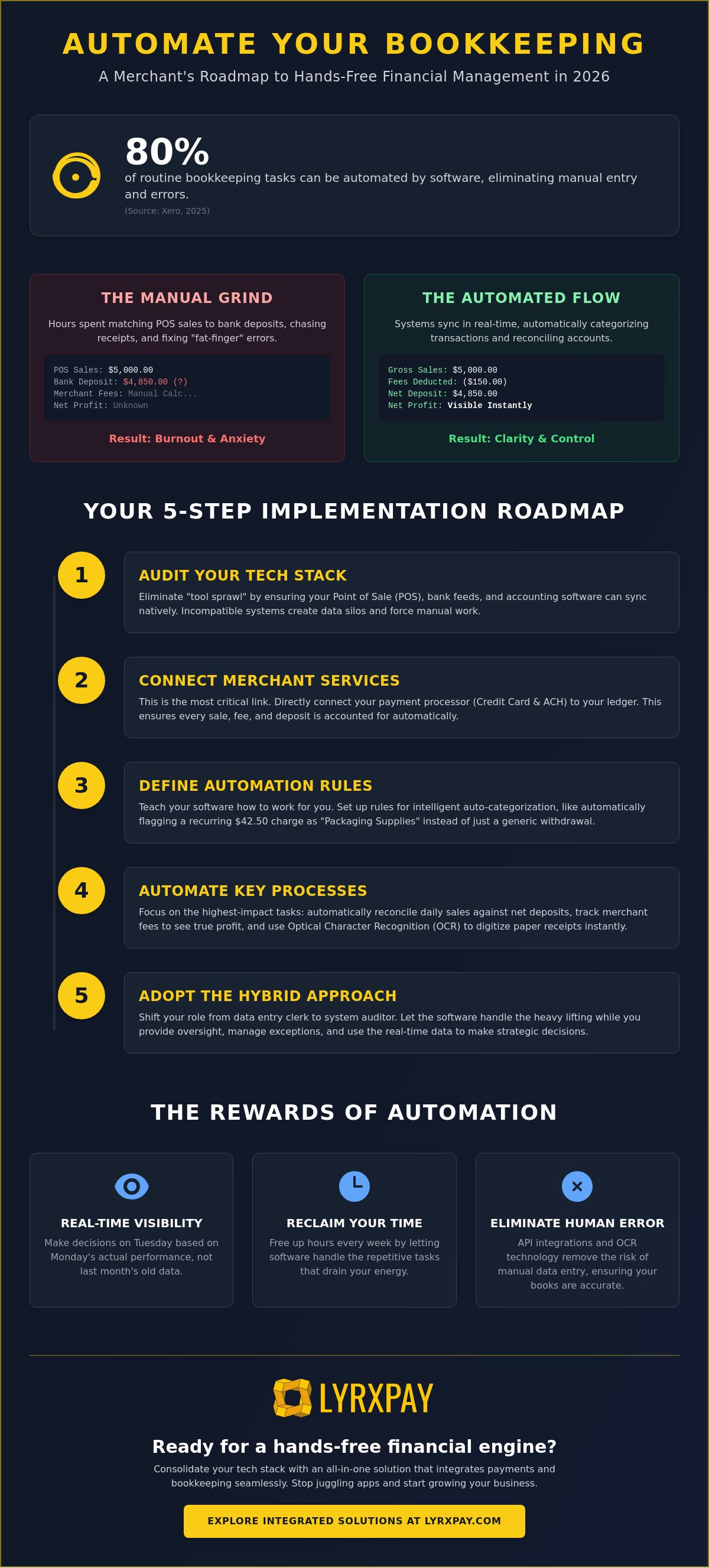
Did you know that 80% of routine bookkeeping tasks can now be handled entirely by software according to 2025 data from Xero? You likely started your business to serve customers and grow your brand, not to spend your Sunday nights squinting at spreadsheets or chasing down missing transaction records. We understand the frustration of manual reconciliation and the lingering anxiety that a single data entry error could lead to a massive headache during tax season. Implementing automated bookkeeping for merchants isn't just a luxury anymore. It is the new standard for staying competitive and maintaining your sanity in 2026.
If you feel buried under a mountain of digital receipts, you are in the right place. This guide will show you how to build a direct bridge between your payment processor and your ledger, allowing you to reconcile your merchant accounts in minutes rather than days. We will explore the latest strategies to eliminate manual data entry for good and provide a clear roadmap to the real-time financial visibility you deserve. By the end of this article, you will have the tools to turn your accounting into a hands-free engine that supports your growth instead of slowing it down.
Key Takeaways
- Learn to distinguish between basic data fetching and the intelligent auto-categorization that ensures your ledger stays accurate without manual intervention.
- Follow our five-step roadmap to implement automated bookkeeping for merchants and finally bridge the gap between your payment processor and your accounting software.
- Discover how to automatically reconcile daily sales and track merchant fees to see your true net profit in real-time.
- Find out why a hybrid approach is the safest path forward, allowing you to act as a system auditor while software handles the heavy lifting.
- Explore the benefits of consolidating your tech stack to lower costs, minimize data errors, and reclaim hours of your time every week.
What is Automated Bookkeeping for Merchants?
Automated bookkeeping for merchants isn't just about moving numbers from one screen to another; it's the real-time syncing of your sales, processing fees, and operational expenses directly into a digital ledger. While traditional Accounting software has existed for decades, the modern version does more than just fetch data. It uses intelligent auto-categorization to understand what those numbers actually represent. For example, "data fetching" might show a withdrawal, but "auto-categorization" recognizes that specific $42.50 charge as a recurring packaging supply expense based on your previous history. This distinction is what separates a simple digital list from a truly hands-free financial system.
If you run a retail or e-commerce business, you likely face the "batch gap" daily. Your Point of Sale (POS) system might report $5,000 in sales, but your bank statement shows a deposit of $4,850. Matching these figures manually while accounting for merchant fees and chargebacks is a recipe for burnout. Automated bookkeeping for merchants solves this by identifying gross sales, separating the processing fees, and matching the net deposit to your bank statement automatically. This shifts your role from reactive monthly cleanup to proactive daily management. You can stop wondering where your cash is and start seeing your true margins every single morning.
The End of Manual Data Entry
Manual entry is the primary cause of accounting discrepancies for modern retailers. It's incredibly easy to mistype a digit or lose a paper receipt in the shuffle of a busy workday. Today, Optical Character Recognition (OCR) technology handles physical receipts by reading them and converting the text into digital data points. Meanwhile, API integrations pull transaction details directly from your merchant accounts without you lifting a finger. This eliminates the "fat-finger" errors that lead to tax anxiety and messy books. When your systems talk to each other directly, the risk of human error virtually disappears.
Why 2026 is the Year to Automate
The complexity of selling has exploded recently. You aren't just selling over a counter; you're likely managing sales through online storefronts, mobile apps, and physical locations simultaneously. AI-native tools have matured enough in 2026 to learn your specific business patterns, recognizing unique revenue streams without being told twice. Automated bookkeeping is a continuous loop of data verification rather than a month-end event. This level of automated bookkeeping for merchants gives you the clarity to make decisions on Tuesday based on Monday's actual performance. It's about having a reliable ally that manages the administrative heavy lifting so you can focus on your craft.
How to Implement Automated Bookkeeping in 5 Steps
Transitioning to a hands-free system feels like a weight being lifted from your shoulders. It's about moving from a state of constant catching up to a state of total control. Implementing automated bookkeeping for merchants follows a logical path that starts with your existing tools and ends with a self-sustaining financial engine. This process isn't about replacing your oversight; it is about replacing the repetitive, low-value tasks that drain your energy.
Step 1: The Tech Stack Audit
Stop "tool sprawl" before it starts. Many business owners use separate apps for invoicing, inventory, and payments that don't talk to each other. This creates data silos. You need to verify that your Point of Sale hardware is fully compatible with your accounting software. If they don't sync natively, you will be stuck with manual exports. Check your bank feeds too. Ensure they support real-time syncing so your ledger stays current without you having to upload CSV files every Monday morning.
Step 2: Connecting Your Merchant Services
Your payment processor is the most critical link in the automation chain. If your processor is disconnected from your ledger, you're forced to manually calculate fees and batch totals. Linking your credit card and ACH processing directly to your accounting software ensures every cent is accounted for the moment it clears. This setup allows for next-day deposits to reconcile automatically, giving you a clear picture of your cash flow. You can streamline this entire setup by choosing integrated merchant services that prioritize ledger connectivity.
Step 3: Setting the Rules
Software is only as good as the rules you give it. You must define categorization rules so the system knows exactly where to put recurring expenses like rent or utilities. Mapping is equally vital for your revenue. You need to ensure that sales tax and tips are funneled into the correct liability accounts. While the duties of bookkeeping and accounting once required hours of manual sorting, modern rules allow the system to handle the vast majority of these tasks with pinpoint accuracy.
Once your rules are active, establish a recurring review schedule. Spend ten minutes a week verifying that the AI-driven entries are landing in the right spots. This keeps the system honest and prevents small errors from snowballing. Finally, begin phasing out manual processes one department at a time. Start with sales reconciliation, then move to accounts payable. This gradual shift ensures accuracy and helps your team adapt to their new roles as system auditors. By following this roadmap, automated bookkeeping for merchants becomes a reliable asset rather than a complex project.
Key Merchant Processes You Should Automate Now
Identifying which tasks to offload first is the secret to a smooth transition. While you might be tempted to overhaul every department at once, focusing on high-volume transaction areas provides the fastest relief and the highest return on your time. According to 2025 data from Xero, 80% of routine bookkeeping tasks can now be handled by software. By targeting the right workflows, you can reclaim hours of your week almost immediately. Focus your initial automated bookkeeping for merchants strategy on these four pillars:
- Daily Sales Reconciliation: Software should automatically match your POS batches to your bank deposits without manual intervention.
- Fee Tracking: Every processing fee should be logged as a separate line item to ensure your net deposits are always accurate.
- Inventory Adjustments: Syncing sales with stock levels ensures your balance sheet reflects real-time asset values.
- Accounts Payable: Automating vendor payments through ACH helps you avoid late fees and maintain strong supplier relationships.
Sales and Processing Fee Reconciliation
Many business owners struggle with the "Invisible Cost" problem. This happens when manual bookkeeping misses small fee discrepancies that add up to thousands of dollars over a fiscal year. If you aren't logging these fees in real-time, you are essentially guessing at your true profit margins. Using QuickBooks integrated payment processing allows you to automate this entire logging process. The system identifies the gross sale, calculates the specific fee, and records the net deposit in one motion. This level of integration achieves a "zero-touch" reconciliation for standard daily batches, ensuring your books are always ready for a surprise audit or a loan application.
Automated Payroll and Tax Compliance
Payroll is often the most stressful administrative task because the stakes are so high. Linking your payroll solutions directly to your general ledger allows for automatic wage and tax accrual with every pay cycle. This isn't just about saving time; it's about accuracy. Automation handles complex calculations like overtime, employee benefits, and local tax withholdings with a precision that manual entry can't match. As noted in this Small Business Bookkeeping Guide, maintaining consistent, time-stamped digital records is your best defense against IRS inquiries. When your automated bookkeeping for merchants includes payroll, you create a transparent trail that proves compliance and reduces tax-season anxiety. You can stop worrying about filing deadlines and start focusing on the strategic growth of your team.
The Hybrid Approach: Why Humans Still Matter
While the technology behind automated bookkeeping for merchants is revolutionary, it isn't a total replacement for human judgment. Think of automation as a highly efficient engine; it provides the power to move forward, but you still need a driver to steer toward the right destination. AI excels at repetitive patterns, but it can struggle with complex tax edge cases or sudden shifts in business strategy that don't fit historical data. By adopting a hybrid approach, you transition from being a data entry clerk to a system auditor. This shift allows you to maintain total control over your financial health without the burden of manual labor.
Managing the "Exceptions"
Even the best software will occasionally encounter a transaction it doesn't recognize. Perhaps you bought supplies from a new vendor or received a unique reimbursement. These "exceptions" are where human oversight is vital. You should set up monthly checkpoints to review the exceptions report generated by your tools. This is especially important for handling refunds and chargebacks. Because these transactions often involve specific customer disputes or inventory returns, they require a level of nuance that algorithms haven't mastered yet. Establishing a clear protocol for flagged transactions ensures that your books remain accurate and your records stay clean for tax season.
Strategic Financial Analysis
Automation provides the data, but humans provide the direction. Once your automated bookkeeping for merchants is humming along, you can move from asking "what happened?" to "what should we do next?" Clean, real-time data is the foundation of reliable cash flow forecasting. You can see exactly how much capital you'll have in three months based on current sales trends and automated expense tracking. This clarity lets you make bold moves, like expanding your inventory or hiring new staff, with confidence rather than guesswork. You are no longer just recording history; you are actively shaping your future.
Professional bookkeeping support acts as a critical safety net for these automated systems. Even with great software, having an expert eye to review your month-end close provides peace of mind that a computer simply can't offer. This combination of high-speed technology and professional expertise ensures that your business stays compliant while you stay focused on your craft. If you're ready to stop the manual grind and start leading with data, explore our professional bookkeeping and merchant services to build a system that works for you.
Choosing an All-in-One Solution for 2026
Consolidating your financial tools into a single ecosystem is the most effective way to eliminate technical friction. When your payment processing, POS hardware, and ledger live under one roof, data silos disappear. Many business owners struggle with "tool sprawl," which is the result of using too many disconnected platforms that each charge their own fees and require separate logins. By streamlining these services, you lower your monthly overhead and minimize the number of data integration points that could potentially fail. True automated bookkeeping for merchants is most successful when the bridge between your sales floor and your back office is as short as possible.
The Synergy of Integrated Merchant Services
Why deal with three different support teams when you can have one dedicated ally? A single ecosystem reduces the stress of managing complex operational tasks by ensuring every piece of hardware and software is designed to communicate. If you have a dedicated account manager who understands both your processing volume and your bookkeeping needs, you gain a level of personal attention that large, faceless banks can't match. This partnership allows you to implement strategies on how to lower merchant fees while simultaneously automating your accounting workflows. It is about creating a "managed care" environment for your business, where the administrative heavy lifting is handled for you.
Getting Started with LyrxPay
LyrxPay bridges the gap between merchant services and back-office efficiency with a focus on results. Our direct QuickBooks integration is designed to eliminate manual entries for good, ensuring that your sales data and processing fees sync perfectly every night. This level of automated bookkeeping for merchants is enhanced by next-day deposits, which simplify your cash flow tracking and make reconciliation a breeze. Whether you run a professional firm or a medical office, our customized POS and bookkeeping support is tailored to the specific rhythms of your industry. We don't just provide tools; we provide a path forward that respects your time and resources.
If you're ready to reclaim your Sunday nights and eliminate tax-season anxiety, the transition to a hands-free system is the logical next step. Start by auditing your current tools and identifying where manual data entry is slowing you down. By choosing a unified solution, you move from a state of constant administrative catch-up to a state of professional confidence. You've done the hard work of building your business; now it's time to let modern automation protect your growth. Reach out today to see how a consolidated approach can transform your operations and give you the financial visibility you deserve.
RECLAIM YOUR TIME AND FOCUS ON GROWTH
The transition to automated bookkeeping for merchants is no longer a futuristic concept; it's a vital strategy for scaling in 2026. You've seen how bridging the gap between processing and your ledger eliminates the stress of manual reconciliation. It provides total financial clarity. By adopting a hybrid approach, you remain the strategic driver while software handles the administrative heavy lifting. Your data stays clean, accurate, and ready for tax season without the Sunday night spreadsheets.
Stop chasing receipts. Start leading with confidence. We provide QuickBooks and Xero expert integration to ensure your systems talk to each other perfectly. Our next-day deposits for better liquidity and national support for retail and service merchants give you the operational health you deserve. Ready to eliminate manual bookkeeping? Schedule a LyrxPay consultation today. We are here to make the complicated feel manageable so you can stay focused on your craft and your customers.
Frequently Asked Questions
Is automated bookkeeping secure for my merchant data?
Security is the top priority, and modern automation uses bank-level AES-256 encryption to keep your sensitive data safe. By using direct API connections instead of sharing login credentials, you significantly reduce the risk of unauthorized access. It's a much more robust defense than the old method of emailing financial spreadsheets back and forth. You maintain total control over who sees your data while the system works quietly in the background.
How much time can a merchant really save with automation?
Merchants often reclaim five to ten hours every week by removing the burden of manual data entry and batch reconciliation. According to a March 2026 report from CPA.com, businesses using these tools see a 30% faster month-end close. Implementing automated bookkeeping for merchants allows you to spend that time on customer service or product development instead of squinting at spreadsheets. It's about working on your business rather than in it.
Will automated bookkeeping replace my accountant?
Automation won't replace your accountant; it will empower them to be a more effective partner for your growth. By handling the repetitive "heavy lifting" of data entry, the software frees your accountant to focus on strategic tax planning and financial forecasting. You get the best of both worlds: high-speed data processing and expert human insight. This shift allows your financial team to provide advice that actually moves the needle for your business.
Does LyrxPay integrate with QuickBooks and Xero?
LyrxPay offers seamless, native integration with both QuickBooks and Xero to ensure your data flows perfectly. This direct connection means your credit card and ACH transaction data land in your ledger without the need for manual exports or complex workarounds. It is a "plug-and-play" solution designed to keep your financial records current in real-time. You can stop worrying about data silos and start enjoying a unified view of your business health.
What happens if the automation categorizes something incorrectly?
If the software makes a mistake, you can quickly re-categorize the transaction in the "Exceptions" report, and the system learns from your correction. This is the beauty of automated bookkeeping for merchants in 2026; the machine learning gets smarter with every interaction. Over time, the need for manual adjustments drops significantly as the tool adapts to your specific business patterns. You remain the final auditor while the software does the clerical work.
Can I use automated bookkeeping for multiple business locations?
You can absolutely manage multiple business locations through a single, centralized automated dashboard. Whether you have three physical retail shops or a mix of online and mobile storefronts, the system consolidates all revenue streams into one ledger. This provides a clear, bird's-eye view of your entire operation while still allowing you to filter reports by specific site. It makes managing a growing enterprise feel as simple as running a single shop.
How much does it cost to set up automated bookkeeping?
The cost to set up an automated system depends on your specific business needs and the complexity of your current tech stack. While we don't provide fixed pricing here, most merchants find the investment pays for itself quickly through reclaimed time and reduced clerical errors. It is a trade-off where you replace a recurring manual headache with a streamlined, long-term asset. We focus on providing a solution that scales with your success.
What is the difference between AI accounting and standard automation?
Standard automation follows rigid "if-this-then-that" rules, while AI accounting uses machine learning to adapt to unpredictable data. While a standard rule might only recognize a specific vendor name, AI can look at the context of a receipt to determine the expense type with 95-99% accuracy. This allows the system to handle messy, unstructured data that would typically break a standard automation sequence. It's the difference between a simple tool and a smart ally.