
How to Integrate Payroll with QuickBooks: The 2026 Merchant's Guide

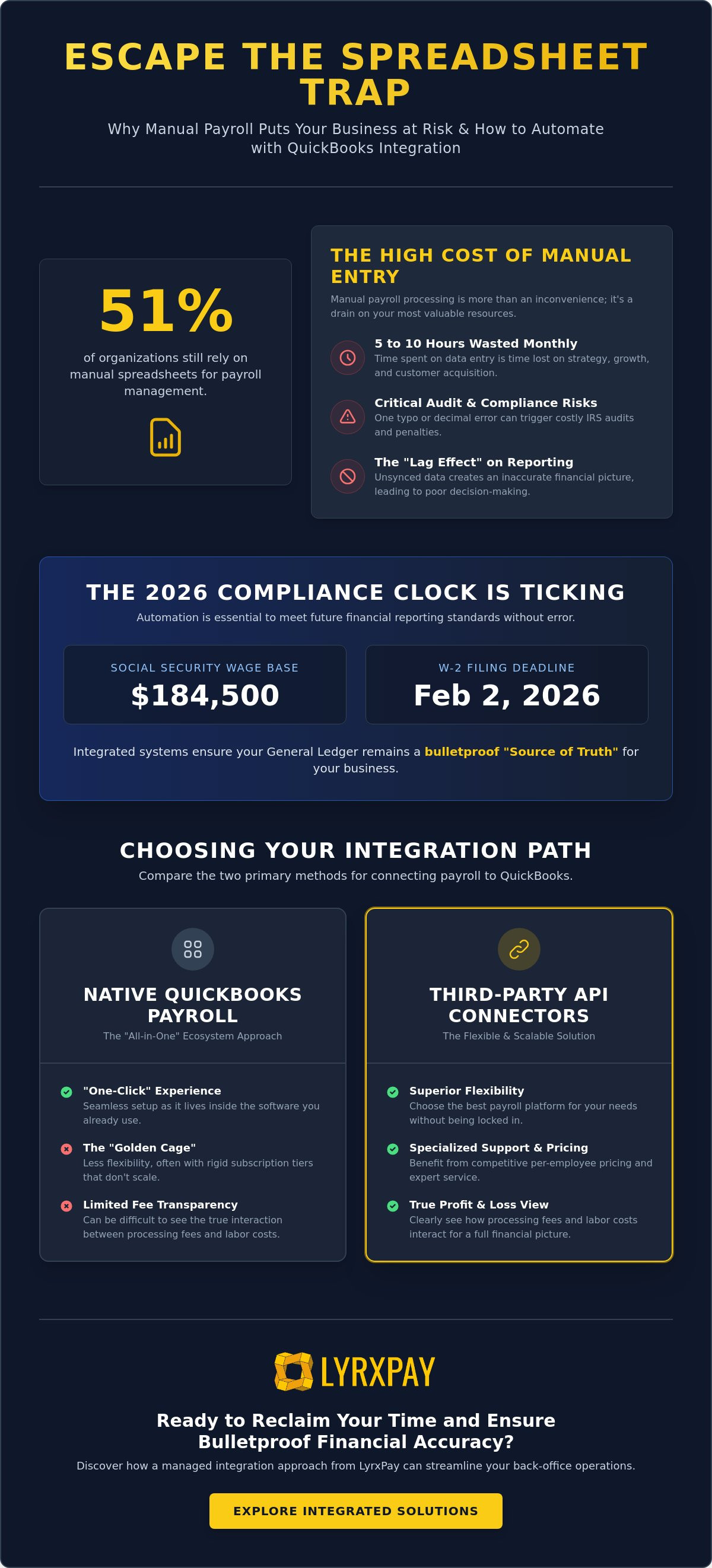
Did you know that 51% of organizations still rely on manual spreadsheets to manage their payroll? If you're part of that group, you likely feel the mounting pressure every pay period as you juggle data entry with the constant fear of a sync error. Learning how to integrate payroll with QuickBooks is the most direct path to reclaiming your schedule and ensuring your business stays compliant with the 2026 Social Security wage base of $184,500.
We agree that your time is your most valuable asset. If you're tired of the manual grind, this guide will help you master the seamless synchronization of your data to eliminate errors and ensure bulletproof financial accuracy. We'll explore the latest automation trends, provide a step-by-step roadmap for connecting your systems, and show you how to make reconciliation a stress-free part of your routine.
Key Takeaways
- STOP THE DRAIN. Eliminate the 5 to 10 hours wasted on manual data entry every month while protecting your business from the audit risks of manual typos.
- EVALUATE YOUR OPTIONS. Compare the simplicity of native Intuit ecosystems against the flexibility of third-party API connectors to find your ideal operational fit.
- SYNC WITH CONFIDENCE. Master exactly how to integrate payroll with QuickBooks by properly mapping your Chart of Accounts and authorizing secure data bridges.
- PREVENT DATA MISMATCHES. Learn to navigate the "Duplicate Entry" trap and reconcile timing differences between your pay runs and actual bank drafts.
- LEVERAGE EXPERT SUPPORT. Discover how a managed integration approach acts as a defensive ally for your back-office, removing the technical heavy lifting from your shoulders.
Why Manual Payroll Entry is a Risk to Your 2026 Growth
Every time you sit down to manually key in payroll data, you're doing more than just administrative work; you're actively draining your business's momentum. For many merchants, this "double entry" routine consumes between 5 and 10 hours every single month. That's time you could spend on product development, customer acquisition, or simply taking a well-deserved break. When you master how to integrate payroll with QuickBooks, you stop being a data processor and start being a strategist. This shift is the first step toward a "concierge" accounting model where your systems talk to each other so you don't have to.
One misplaced decimal or a typo in a tax field isn't just a minor annoyance. In the eyes of the IRS, it's a red flag. Manual errors are among the leading triggers for audits, especially as reporting requirements become more stringent. Beyond the legal risk, there's the "Lag Effect." If your payroll data isn't synced immediately, your financial reports are essentially lying to you. You might think you have a healthy cash cushion, only to realize that pending payroll bank drafts haven't been accounted for in your dashboard. This visibility gap makes it nearly impossible to make confident, real-time decisions about hiring or inventory investment.
The Reality of Administrative Burnout
There comes a point where manual tasks don't just slow you down; they stop you from scaling. If you're spending your Sundays reconciling wages instead of refining your business model, you've hit the administrative ceiling. Business owners should focus on their craft, not on the minutiae of data entry. Shifting toward payroll automation provides a psychological relief that's hard to quantify until you experience it. It's the difference between feeling buried under paperwork and feeling in total control of your operations. When your systems are synchronized, you reclaim the mental bandwidth needed to lead your team effectively.
Tax Compliance in the Digital Age
The landscape for 2026 demands tighter reporting between your payroll and your books. With the Social Security wage base rising to $184,500 and the W-2 filing deadline set for February 2, 2026, there's no room for error. QuickBooks serves as your central financial "Source of Truth," but it's only as reliable as the data it receives. If your systems aren't integrated, you're essentially playing a game of telephone with your own finances. A General Ledger is the master record of all your business transactions that serves as the ultimate foundation for your company's financial health. By automating the flow of data into this ledger, you ensure that your tax standing remains bulletproof throughout the year.
Understanding Your Integration Options: Direct vs. Third-Party
Choosing the right path for how to integrate payroll with QuickBooks depends largely on your tolerance for administrative complexity. Native QuickBooks Payroll offers the tightest "one-click" experience because it lives directly inside the software you already use. However, staying entirely within the Intuit ecosystem can sometimes feel like a golden cage. You might save time on the initial setup, but you often trade away the specialized support and fee transparency found with independent providers who specialize in high-growth merchant needs.
On the other hand, third-party connectors use APIs to bridge the gap between your preferred payroll platform and your accounting software. This is often the superior choice for merchants who need all in one business financial solutions that provide a clearer view of how processing fees and labor costs interact. If your business handles high volumes of credit card or ACH transactions, seeing these figures side-by-side in QuickBooks is essential for maintaining a true profit-and-loss statement. It allows you to see the real cost of doing business without toggling between three different browser tabs.
Native vs. External: The Cost-Benefit Analysis
While native solutions simplify the question of how to integrate payroll with QuickBooks, they often come with rigid subscription tiers that may not scale with your specific needs. External payroll partners frequently offer more competitive per-employee pricing or bundled merchant services that lower your overall overhead. Security is another factor; granting API access to a trusted third party is now a standard, secure practice that uses encrypted tokens rather than sharing your master login credentials. If you're looking for a partner who treats your security as a priority, LyrxPay offers the managed care your business deserves.
For businesses with highly complex needs or those using legacy systems, the Journal Entry method remains a viable fallback. Instead of a live sync, you import a summarized "bulk" file at the end of each pay period. This keeps your ledger clean but sacrifices the real-time visibility that automated systems provide. Most modern merchants find that the "Managed Integration" model is the sweet spot, where experts handle the technical handshake so you can focus on your craft.
Mapping Your Chart of Accounts
Integration is only as good as your mapping. If your "Wages" in your payroll app don't point to the exact same "Wages" account in QuickBooks, your reports will be a mess. You need to align four critical categories to ensure your books stay balanced:
- Gross Wages and Salaries
- Employer-paid Taxes (FICA, FUTA, SUTA)
- Benefit Contributions (Health, 401k)
- Payroll Liabilities (Taxes withheld but not yet paid)
Step-by-Step: How to Integrate Payroll with QuickBooks
Syncing isn't magic. It's a logical bridge between two databases that requires a clear set of instructions to function correctly. When you're looking for how to integrate payroll with QuickBooks, you need to treat the process as a structured sequence rather than a quick toggle. If you rush the handshake between your platforms, you'll likely spend more time fixing errors than you would have spent on the initial setup.
Preparing your QuickBooks Chart of Accounts is your first critical move. You must ensure that specific sub-accounts exist for gross wages, employer taxes, and various benefit liabilities. If these don't exist yet, create them now. Once your accounts are ready, navigate to your payroll provider's settings to authorize the connection. This is where you'll grant the necessary permissions for the two systems to share data securely. Accuracy depends on the mapping phase; you must manually link each earning type and tax category in your payroll software to the corresponding account in QuickBooks. This ensures that every dollar has a pre-defined destination before the sync begins.
Before you commit to a full automation schedule, run a "Test Sync" using a single, completed pay period. This allows you to verify that the totals appearing in your General Ledger match your payroll reports exactly. If everything aligns, you can safely set up automated recurring synchronization. This feature will push data to your books every time you run payroll, keeping your financial records current without any additional clicks.
The Pre-Integration Checklist
Success starts before you ever click "Connect." First, verify your version of QuickBooks. Whether you use Online or Desktop, the integration steps vary slightly, and compatibility is key. You also need to gather your payroll liability account numbers to avoid guessing during the mapping phase. Most importantly, ensure you have "Admin" level permissions in both your payroll platform and QuickBooks. Without the right roles assigned, the API handshake will fail, leaving you stuck at the first gate.
Troubleshooting the First Sync
Even the best setups can hit a snag during the initial run. If your totals don't match, the culprit is usually an "Unmapped" item, such as a new benefit or a specific state tax that wasn't linked to an account. Handling split deposits or employee reimbursements can also complicate the sync; these often require specific rules to ensure they don't appear as duplicate expenses. For those who need a more hands-on approach, exploring quickbooks bookkeeping services for small business can provide the expert oversight needed to refine these settings for long-term accuracy.
Avoiding Common Integration Pitfalls and Data Mismatches
Even after you've mastered how to integrate payroll with QuickBooks, the work isn't entirely over. The most common mistake merchants make is falling into the "Duplicate Entry" trap. This happens when your payroll provider automatically sends a tax payment entry to QuickBooks, but you've already manually recorded it from your bank feed. Suddenly, your books show you've paid the IRS twice. To avoid this, you must decide which system is the master record for tax liabilities and stick to it religiously.
Timing is another frequent source of friction. Your employees might see their pay on Friday, but your bank draft might not clear until the following Monday. If you're reconciling your books on a strict weekly basis, this three-day gap can make it look like your accounts are out of balance. This is especially true for businesses utilizing mobile credit card processing for business, where daily deposits and payroll drafts are constantly moving in and out. If you don't account for these timing differences, your real-time cash flow view will be distorted.
Handling merchant service fees is another area where integrations often stumble. Many payroll providers charge separate ACH fees or service costs that don't always sync neatly into your labor categories. If these processing costs are lumped in with gross wages, your labor reports will be inflated. You need to categorize these fees as bank service charges or a dedicated payroll processing expense account. If you're looking for a partner to simplify this, explore our integrated payroll solutions.
Don't let "Auto-Sync" lull you into a false sense of security. While automation is a powerful ally, it isn't a replacement for a human eye. A monthly manual review is essential to catch small discrepancies before they snowball into year-end nightmares. If you want to ensure your integration is running at peak efficiency, speak with a professional who understands the specific needs of your industry.
Reconciling Payroll with Cash Flow
Managing the flow of funds requires a clear distinction between "Net Pay" drafts and "Tax Liability" drafts. These are rarely the same transaction. If you see a single lump sum leaving your bank account, you must ensure your QuickBooks entry splits that amount correctly. Many successful merchants use clearing accounts to manage these timing differences. This acts as a temporary holding pen for funds until the bank draft officially clears, ensuring your general ledger remains accurate every single day.
Security and User Permissions
Accuracy is vital, but privacy is equally important. Not every user with access to your QuickBooks needs to see the specific salary details of your entire staff. By limiting payroll visibility to only those who absolutely need it, you protect sensitive employee data and reduce the risk of accidental changes to your integration settings. Setting up audit logs allows you to track exactly who modified a mapping or triggered a sync. Data privacy is just as important as data accuracy when you're building a sustainable business.
Streamlining Your Workflow with LyrxPay Integrated Solutions
If the technical details of how to integrate payroll with QuickBooks still feel overwhelming, you don't have to face them alone. LyrxPay acts as your defensive ally, stepping in to manage the complex administrative tasks that distract you from your craft. While other platforms give you a login and a list of instructions, we provide a managed integration experience. This means we handle the heavy lifting of the initial handshake, the account mapping, and the ongoing maintenance of your data bridge. We believe that a merchant's time is too valuable to be spent debugging API connections or reconciling misaligned tax fields.
By consolidating your payment processing and payroll under one roof, you naturally lower your operational overhead. You're no longer paying for fragmented apps that fail to communicate. Instead, you benefit from a unified system where your credit card sales and payroll drafts are visible in a single, coherent dashboard. We also prioritize your cash flow with next-day deposits. This improved liquidity ensures that when it's time to run payroll, the funds are exactly where you need them. You won't have to worry about the "Lag Effect" mentioned earlier because your books will reflect your actual bank balance in real time.
The LyrxPay Advantage: Beyond the Software
The LyrxPay advantage goes beyond just software. You gain access to expert support that understands the specific nuances of merchant accounting and the 2026 regulatory landscape. Whether you need a customized POS setup or a payroll system that communicates natively with your general ledger, we build the infrastructure that fits your business model. We don't just offer a tool; we offer a partnership. It's why thousands of business owners choose to switch merchant service providers every year. They are looking for a partner who values integration as much as they do and who treats their back-office health as a priority.
Getting Started with a Stress-Free Sync
Starting with us is a straightforward, three-step process designed to minimize friction and maximize clarity. First, we conduct a thorough audit of your current setup to identify fee-saving opportunities you might be missing. Second, we configure your QuickBooks integration to ensure every tax field and wage category is mapped correctly from day one. Finally, we provide a guided walkthrough of your new dashboard to make sure you're confident in your automated workflow. We take pride in making the complicated feel manageable, allowing you to get back to what you do best. Ready to automate? Let LyrxPay handle your QuickBooks integration today.
TAKE CONTROL OF YOUR BACK-OFFICE OPERATIONS
You've seen how manual data entry drains your resources and creates unnecessary risks in a landscape of rising wage bases and strict filing deadlines. Moving toward a synchronized system isn't just a technical upgrade; it's a commitment to the long-term health of your business. By now, the path for how to integrate payroll with QuickBooks is clear. It's about shifting from administrative burnout to operational clarity. When your payroll data flows directly into your general ledger, you eliminate the typos that trigger audits and the timing gaps that often obscure your real-time cash flow.
You don't have to navigate this technical handshake alone. We provide expert QuickBooks integration support, next-day deposits for better liquidity, and lower merchant and ACH processing fees to keep your overhead lean. It's time to stop fighting with spreadsheets and start investing your mental energy back into your craft. We're here to act as your defensive ally every step of the way.
Streamline Your Business with LyrxPay Integrated Solutions
Your business deserves a foundation of accuracy and speed. Take the first step toward a more manageable future today.
Frequently Asked Questions
Can I integrate third-party payroll like ADP or Gusto with QuickBooks?
Yes, you can integrate most major third-party platforms by using their built-in QuickBooks connectors. These platforms use secure APIs to push your payroll data directly into your accounting software. This setup ensures that your labor costs are reflected accurately without the need for manual entry. By choosing an external provider, you often gain access to specialized features and support that native solutions might lack.
What is the difference between a direct sync and a journal entry import?
A direct sync provides an automated, line-by-line transfer of data, while a journal entry import is a manual upload of summarized totals. Direct sync is the standard for 2026 because it offers real-time visibility into your cash flow and reduces the risk of typos. Journal entries are better suited for legacy systems or businesses that prefer to keep their general ledger uncluttered by individual employee details.
Do I need QuickBooks Online or Desktop for payroll integration?
Both versions support integration, but QuickBooks Online is the platform where most modern automation happens. Intuit has been phasing out older Desktop payroll products, leading many merchants to migrate to the cloud for better accessibility. When you're learning how to integrate payroll with QuickBooks, the cloud-based version offers the most seamless experience with third-party apps and real-time data sharing.
How do I map my payroll taxes so they show up correctly in my General Ledger?
You map payroll taxes by linking specific tax types in your payroll software to the corresponding liability accounts in your QuickBooks Chart of Accounts. This includes separating employer-paid taxes like FICA and FUTA from employee withholdings. Correct mapping ensures that your financial reports follow federal guidelines, keeping your business audit-ready throughout the year while protecting your tax standing.
What happens if my payroll sync creates duplicate transactions in QuickBooks?
If a sync creates duplicates, you must manually void the redundant entries and review your sync settings. This often happens when both your bank feed and your payroll provider send the same transaction to QuickBooks. To fix this, you can set rules within QuickBooks to ignore certain automated payroll drafts or ensure that your sync is only pushing summarized data rather than individual checks.
Is it better to use QuickBooks' native payroll or an external provider?
Native payroll offers the simplest "one-click" setup, but external providers often provide more robust support and better pricing for high-growth merchants. External partners can bundle your payroll with other merchant services, such as credit card processing, to lower your total overhead. The best choice depends on whether you value the convenience of a single ecosystem or the savings of a specialized partnership.
How much does it cost to set up a payroll integration?
The technical connector itself is usually included with your payroll subscription, but the true cost is the time spent on the initial setup. While some DIY setups are quick, complex businesses often require professional assistance to ensure the mapping is perfect. Investing in a managed setup prevents expensive errors, like miscalculating the 2026 Social Security wage base, which can lead to IRS penalties.
Can LyrxPay help me set up my QuickBooks payroll mapping?
Yes, LyrxPay provides comprehensive support for merchants who want to know how to integrate payroll with QuickBooks without doing the technical heavy lifting themselves. We act as your defensive ally by handling the account mapping and the initial synchronization. Our team ensures that your payroll, POS, and merchant services all communicate natively, allowing you to focus on your craft while we manage the back-office complexity.