
QuickBooks Integrated Payment Processing: The 2026 Guide to Lowering Fees

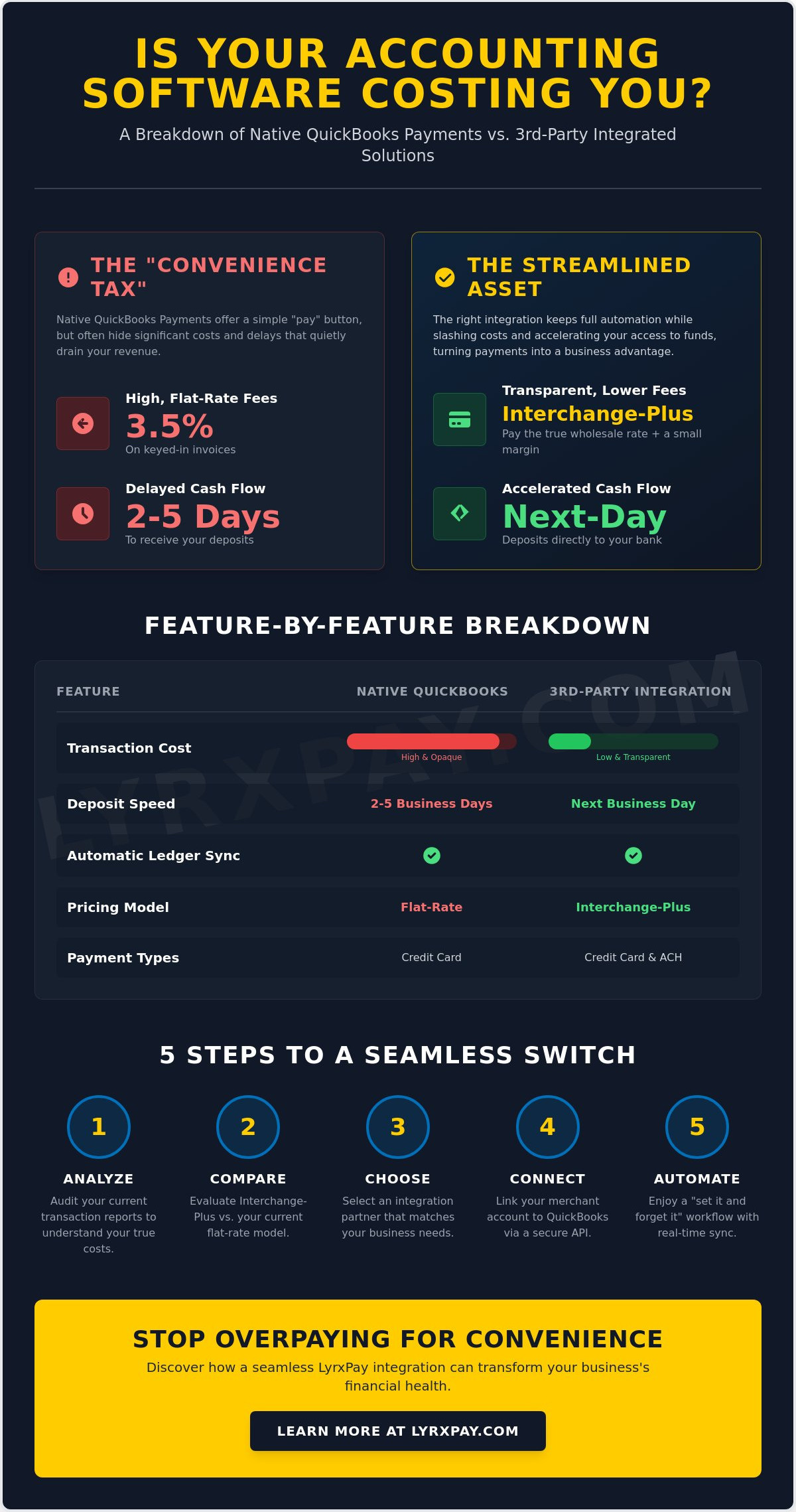
What if the convenience of your accounting software was actually costing you a hidden tax on every single invoice you sent? For many business owners, QuickBooks integrated payment processing feels like a double-edged sword. You love the sync, but you likely don't love the 3.5% fee on keyed-in invoices or the frustrating two to five day wait for your deposits to hit the bank. It's a common struggle, and it's one that often leaves you choosing between your profit margins and your administrative sanity.
We understand that your time is your most valuable resource; you shouldn't have to sacrifice it for manual data entry just to save a few dollars. This guide shows you exactly how to bypass those high native fees while keeping your automation intact. You'll learn how to secure next-day deposits and achieve a "set it and forget it" workflow that keeps your ledger updated automatically. We are diving into how the right integration can turn your payment system from a cost center into a streamlined asset for your business.
Key Takeaways
- UNCOVER THE HIDDEN TAX. Learn why the 2026 financial landscape favors open API integrations that protect your profit margins from expensive, closed ecosystems.
- AUTOMATE WITHOUT THE OVERHEAD. See how QuickBooks integrated payment processing acts as a seamless bridge between your merchant account and your ledger to eliminate manual data entry.
- SLASH TRANSACTION COSTS. Compare flat-rate pricing with interchange-plus models to identify exactly where your current provider is overcharging you on every invoice.
- ACCELERATE YOUR CASH FLOW. Move beyond the standard multi-day wait for funds and discover how next-day deposits can transform your daily liquidity.
- AUDIT YOUR CURRENT SETUP. Use our five-step implementation template to analyze your transaction reports and find an integration that matches your specific business needs.
Understanding QuickBooks Integrated Payment Processing for 2026
Think of QuickBooks integrated payment processing as the vital digital bridge between your merchant account and your general ledger. It isn't just a "pay now" button on an invoice; it's a sophisticated data pipeline that ensures every cent collected is instantly reflected in your accounting records. In 2026, the financial landscape has shifted decisively toward open API integrations. While closed ecosystems once forced you to use their own tools, modern businesses now thrive by picking specialized partners that offer better rates and superior service without losing the convenience of a synced system.
A payment processor is the engine that handles the actual movement of money, but the integration is what makes that movement visible to your bookkeeping software. When you choose a third-party integrated solution over a "native" Intuit option, you're essentially choosing to keep your accounting software as your record-keeper while hiring a more efficient expert to handle the cash flow. This separation of duties is the secret to eliminating "double-entry" bookkeeping. If your payments sync automatically, you remove the human error that inevitable creeps in during manual reconciliation, protecting your data integrity and your peace of mind.
The Mechanics of Ledger Synchronization
Ledger synchronization is the automatic matching of payments to open invoices. When a client pays an invoice through your portal, the data flows from the point of sale directly into your QuickBooks Chart of Accounts. Most small businesses benefit from real-time synchronization, where the invoice is marked as "paid" the moment the transaction is authorized. However, high-volume enterprises might prefer batch synchronization to keep their ledger clean and organized. If you automate this flow, you save hours of administrative labor every week, allowing you to focus on growth rather than chasing down missing entries.
Why Native Processing Often Costs More
Why do so many businesses settle for higher fees? It's often due to the "Convenience Tax." Intuit frequently charges a premium for their built-in payment button because they know it's the path of least resistance. This often results in a significant disparity between keyed-in rates and swiped rates, which can quietly drain your revenue if you handle many remote invoices. By moving to a third-party processor, you can access interchange-plus pricing. This model provides total transparency by showing you the wholesale cost of the transaction plus a small, fixed margin, ensuring you never pay more than necessary for the sake of a simple sync.
How 3rd-Party Payment Integrations Work with QuickBooks
The "bridge" software is the unsung hero of your back office. It creates a secure handshake between your Merchant ID (MID) and your QuickBooks company file. Unlike the older, clunky plugins that required manual exports, modern QuickBooks integrated payment processing uses direct API calls to communicate. This means the moment a card is swiped or an ACH payment is authorized, the system identifies the specific invoice number and marks it as paid in real time. You don't have to lift a finger to update your books.
Everything happens behind the scenes. You don't have to toggle between different browser tabs or manually reconcile a spreadsheet at the end of the month. When using QuickBooks integrated payment processing, every successful transaction updates the ledger automatically. If a transaction fails, you know immediately. This level of synchronization reduces human error and gives you a clear, honest view of your cash position. It's a "set it and forget it" workflow that actually works. If you're looking for a partner to simplify this setup, exploring integrated merchant services is a great first step.
Managing multiple payment types shouldn't mean managing multiple logins. A quality integration provides a single portal where you can view every transaction, whether it's a credit card tap or an electronic check. This unified view is essential for businesses that want to scale without hiring a full-time clerk just to manage the payment data. It's about efficiency, not just technology.
ACH vs. Credit Card Integration
For B2B companies, ACH integration is often the secret weapon for preserving margins. While credit cards are convenient, the percentage-based fees add up quickly on high-ticket items. An integrated portal allows you to handle both through one interface, automating recurring ACH pulls directly within your QuickBooks billing cycle. This ensures you learn more about ACH payment processing and how it stabilizes your monthly revenue without the typical credit card overhead. You can set up your billing once and let the system pull funds on the due date every month.
Data Security and Compliance
Security in 2026 isn't just about a firewall. It's about tokenization. This process replaces sensitive card data with a unique identifier, or "token," so that the actual numbers never touch your local QuickBooks server. This setup significantly simplifies your PCI compliance requirements because you aren't storing the data that hackers want. By using end-to-end encryption, these integrations help improve cash flow by reducing the risk of fraud-related chargebacks and transaction flags. You get the protection of enterprise-grade security without the administrative headache of managing it yourself.
Native QuickBooks Payments vs. 3rd-Party Integrated Solutions
Why pay a premium for the same result? While Intuit markets their built-in service as the only way to keep your books tidy, it's often the most expensive route. Native QuickBooks integrated payment processing usually relies on a flat-rate pricing model. It sounds simple, but it's designed to protect the provider's profit, not yours. By contrast, third-party integrated solutions use an interchange-plus model. This approach passes the wholesale cost of the transaction directly to you with a transparent, fixed markup. You see exactly what the card networks charge and what your processor earns, eliminating the guesswork.
Wait times are another major differentiator. If you're currently using native payments, you've likely grown used to the 2-5 day delay before funds hit your bank account. In a fast-paced business environment, that's capital sitting on the sidelines. Third-party integrations have standardized next-day deposits, putting your money to work immediately. Don't worry about losing functionality either. You still get the professional "Pay Now" button on your invoices and the same automated ledger updates we discussed earlier. You're simply changing the engine under the hood for a more powerful, cost-effective version of QuickBooks integrated payment processing.
The ROI of Switching
If your business processes $50,000 in monthly volume, even a small percentage difference in rates translates to thousands of dollars saved annually. Beyond the rate itself, consider the hidden cost of "float." When your money is held for several days, you lose the ability to pay vendors early or reinvest in inventory. To see how these numbers impact your specific industry, see our guide on how to lower merchant fees. Maximizing your cash flow is about more than just finding the lowest number; it's about reclaiming your liquidity.
Support and Advocacy
What happens when a large transaction is suddenly flagged for review? With a massive corporation, you're often stuck in a call center queue or chatting with a bot. A third-party partner provides a dedicated merchant account manager who acts as your advocate. This human-centric approach is especially vital for medical and professional offices where transaction volume is high and downtime is not an option. We believe in a concierge style of service that includes regular audits of your statements. If hidden fees start to creep in from the card brands, your partner should be the first to catch them and fight for your bottom line.
Implementation Template: 5 Steps to Seamless Payment Integration
Switching is simpler than you think. While some providers claim that moving away from native tools takes weeks of downtime, a structured approach allows you to transition in a single afternoon. By following this template, you can secure the benefits of QuickBooks integrated payment processing without disrupting your daily operations. We've done the heavy lifting to identify the critical milestones for a successful launch.
- Step 1: Audit your "True" Effective Rate. Don't look at the teaser rate on your statement. Take your total monthly fees and divide them by your total processing volume. This number is your starting point for measuring ROI.
- Step 2: Select a Native Sync Partner. Choose an integration that communicates directly with your specific version of QuickBooks. If the app requires you to upload CSV files, it isn't a true integration.
- Step 3: Map your Chart of Accounts. This is the most vital technical step. You must ensure that payments, merchant fees, and even sales tax or tips are directed to the correct accounts to keep your ledger clean.
- Step 4: Test the Customer Experience. Send a test invoice to yourself. Click the "Pay Now" link to confirm the interface is professional, fast, and mobile-friendly.
- Step 5: Transition Recurring Profiles. Move your existing subscription clients into a secure, PCI-compliant vault. This ensures their billing continues without them having to re-enter their card details.
If you're ready to stop overpaying for your software's built-in options, our team can help you get started with a custom fee audit today.
QuickBooks Online vs. Desktop Considerations
The technical "handshake" depends entirely on which version of QuickBooks you use. QuickBooks Online (QBO) utilizes modern REST APIs for a cloud-to-cloud connection, while QuickBooks Desktop often relies on the "Web Connector" to bridge the gap between your local server and the payment gateway. QuickBooks Online integrations typically offer faster real-time sync than legacy desktop versions. Regardless of your choice, ensure your partner supports the specific version you're running to avoid data fragmentation.
Testing Your Workflow
Never go live without a "Penny Test." Process a $0.01 transaction on a real card and watch how it flows through your system. You want to verify that the invoice is marked as "paid" automatically and that the associated merchant fees are tracked as a separate expense account rather than being deducted from your gross revenue. This distinction is crucial for accurate tax reporting. Finally, take ten minutes to train your staff on the new integrated POS interface. When they feel confident, your customers will too.
Optimizing Your Financial Workflow with LyrxPay
Choosing the right partner for your QuickBooks integrated payment processing is about more than just software. It's about finding an ally who understands that every percentage point and every day of delay impacts your ability to grow. At LyrxPay, we don't just offer a tool; we provide a comprehensive financial strategy designed to keep your margins high and your administrative burden low. We handle the heavy lifting of the initial setup, ensuring your data flows exactly where it needs to go without you having to become a technical expert overnight.
Why should you settle for a five-day wait to access your own revenue? While native solutions often hold your funds in limbo, we prioritize your liquidity. Our next-day deposit standard transforms your 2026 business operations by giving you immediate access to the capital you've already earned. This speed, combined with our transparent pricing models, allows you to move away from Intuit's high flat-rates. If you've been frustrated by "convenience" that comes at the cost of your profit, it's time to switch to a model that rewards your efficiency.
Our expertise extends beyond simple transactions. We help you build a complete ecosystem by integrating your payroll solutions and bookkeeping into your existing QuickBooks environment. This holistic approach ensures that your financial data isn't just accurate; it's actionable. When your payments, payroll, and ledger all speak the same language, you gain a level of clarity that makes scaling your business feel like a logical next step rather than a risky leap.
The LyrxPay "Concierge" Experience
We act as your defender against hidden fees and processing obstacles. If a transaction is flagged or a sync error occurs, you don't have to wait in a generic call center queue. You get personalized support from professionals who understand your specific industry. We provide specialized care for high-stakes environments, such as merchant services for medical offices, where precision and reliability are non-negotiable. Our goal is to ensure your QuickBooks integrated payment processing remains a "set it and forget it" asset that serves your business every single day.
Next Steps for Your Business
Curious about how much you can actually save? The first step is a free, no-obligation statement audit. We'll analyze your current processing reports to identify exactly where you're losing money to hidden markups. Once you decide to move forward, the timeline for going live is fast. Most businesses move from application to their first integrated payment in just a few business days. Don't let another month of high fees drain your resources. Get a personalized QuickBooks integration quote from LyrxPay and take control of your financial workflow today.
Take Control of Your Cash Flow in 2026
Your accounting software should be a tool for growth, not a drain on your profit margins. We've explored how moving beyond native flat-rates allows you to reclaim your revenue while maintaining the automation you rely on. By choosing a third-party partner, you secure the transparency of interchange-plus pricing and the speed of next-day deposits. This shift doesn't just save you money; it improves your daily liquidity and removes the administrative stress of manual reconciliation.
The right QuickBooks integrated payment processing setup ensures your data remains accurate and your workflow stays "set it and forget it." You deserve a partner who acts as your advocate, offering expert integration support and defending your time against hidden fees. It's time to stop settling for the path of least resistance and start choosing the path of highest efficiency. We're here to help you bridge the gap between your merchant account and your ledger with total transparency and dedicated care.
Are you ready to optimize your back office? Streamline your QuickBooks workflow with LyrxPay today and experience the clarity of a truly integrated financial system. Your business is built on your hard work, and we're here to make sure you keep more of what you earn.
Common Questions About QuickBooks Integrated Payment Processing
Will using a 3rd-party processor break my QuickBooks sync?
No, your sync will remain perfectly intact. Modern 3rd-party integrations use secure APIs to create a direct "handshake" with your company file. This ensures that every transaction is recorded and matched to the correct invoice automatically, just like the native version. You don't have to sacrifice your administrative efficiency to get better rates.
How much can I save by switching from native QuickBooks Payments?
Your total savings depend on your monthly processing volume and current fee structure. By moving from a flat-rate model to a transparent interchange-plus model, you eliminate the markup Intuit adds for convenience. Many business owners find that reclaiming even a small percentage of each invoice adds up to thousands of dollars in annual revenue that stays in their own pockets.
Does LyrxPay support both QuickBooks Online and QuickBooks Desktop?
Yes, we provide full support for both QuickBooks Online and the various versions of QuickBooks Desktop. Our team understands the technical nuances of each platform, whether you're using modern cloud-based REST APIs or the legacy Web Connector. We'll ensure your QuickBooks integrated payment processing is configured correctly for your specific software environment.
What is the setup time for integrated payment processing?
The transition is surprisingly fast and typically takes only a few business days. Once your application is approved, the technical mapping of your Chart of Accounts can usually be completed in a single afternoon. We focus on making the move as seamless as possible so your billing cycle continues without any downtime or missed payments.
Can I still send invoices with a "Pay Now" button using LyrxPay?
Absolutely. Your customers will still receive professional, branded invoices that include a secure "Pay Now" link. This link takes them to a mobile-responsive portal where they can pay via credit card or ACH. You keep the professional customer experience they expect while you benefit from lower processing costs and faster fund availability.
How do next-day deposits work with a QuickBooks integration?
Next-day deposits ensure that the funds you collect today are settled into your bank account by the next business day. This is a standard feature of QuickBooks integrated payment processing through our platform. It eliminates the frustrating 2 to 5 day waiting period common with native providers, giving you much better control over your daily cash flow.
Is my data secure when using an integrated 3rd-party app?
Yes, your security is our top priority. We use advanced tokenization and end-to-end encryption to ensure that sensitive cardholder data never touches your local server or QuickBooks file. This setup keeps your business compliant with PCI standards and protects your customers' information from potential vulnerabilities, providing peace of mind for everyone involved.
Do I need to change my bank account to use LyrxPay with QuickBooks?
No, you don't need to open a new bank account to work with us. We can deposit your settled funds directly into your existing business checking account. This makes the switch even easier because you won't have to update your payroll links, vendor autopays, or other established banking connections to start saving on your fees.