
How to Accept Purchasing Cards: A B2B Merchant’s Guide to P-Cards

What if the corporate cards your biggest clients use weren't a drain on your margins, but actually the key to your most profitable contracts? It's a common frustration for B2B merchants learning how to accept purchasing cards while trying to protect their bottom line. You land a major government account, yet the interchange fees on their P-Cards feel like a penalty for growth. You're likely tired of the confusion surrounding Level 2 and Level 3 data, or the manual work required to keep your accounting in order. We believe that your time should be spent on your craft, not decoding complex financial jargon.
This guide provides the clarity you need to master B2B payments and win more high-value contracts. As of January 2026, Visa has retired its Level 2 program, making Level 3 data the only way to secure the best rates. We will walk you through the technical requirements of the Commercial Enhanced Data Program and show you how to lower costs through automation. We'll also preview how to streamline your QuickBooks reconciliation so your back office runs as smoothly as your sales team. By the end, you'll have a clear, manageable path to turning these complex transactions into a significant strategic advantage.
Key Takeaways
- MASTER THE SETUP. Learn the specific technical requirements for how to accept purchasing cards so you can confidently bid on high-value corporate and government contracts.
- CUT YOUR COSTS. Discover how capturing Level 3 data fields automatically lowers your processing fees and protects your bottom line on every transaction.
- STOP MANUAL ENTRY. See how expert QuickBooks integration turns complex B2B reporting into a streamlined, automated process for your bookkeeping team.
- ACCELERATE CASH FLOW. Find out how next-day deposits ensure your business has the immediate liquidity needed to fulfill large-scale orders.
- STAY COMPETITIVE. Understand the shift from traditional "Procure-to-Pay" systems to card-based procurement to ensure you're the preferred vendor for modern enterprise clients.
Understanding Purchasing Cards (P-Cards) in the B2B Landscape
If you're exploring how to accept purchasing cards, you've likely noticed a shift in how your largest clients want to pay. A P-Card is a specialized corporate charge card designed specifically for business procurement. While it looks like a standard credit card, its purpose is to streamline the high volume of small dollar purchases that often bog down traditional accounting departments. You can find a detailed breakdown of the history and function of these tools in this overview of What is a Purchasing Card? and how it differs from consumer credit.
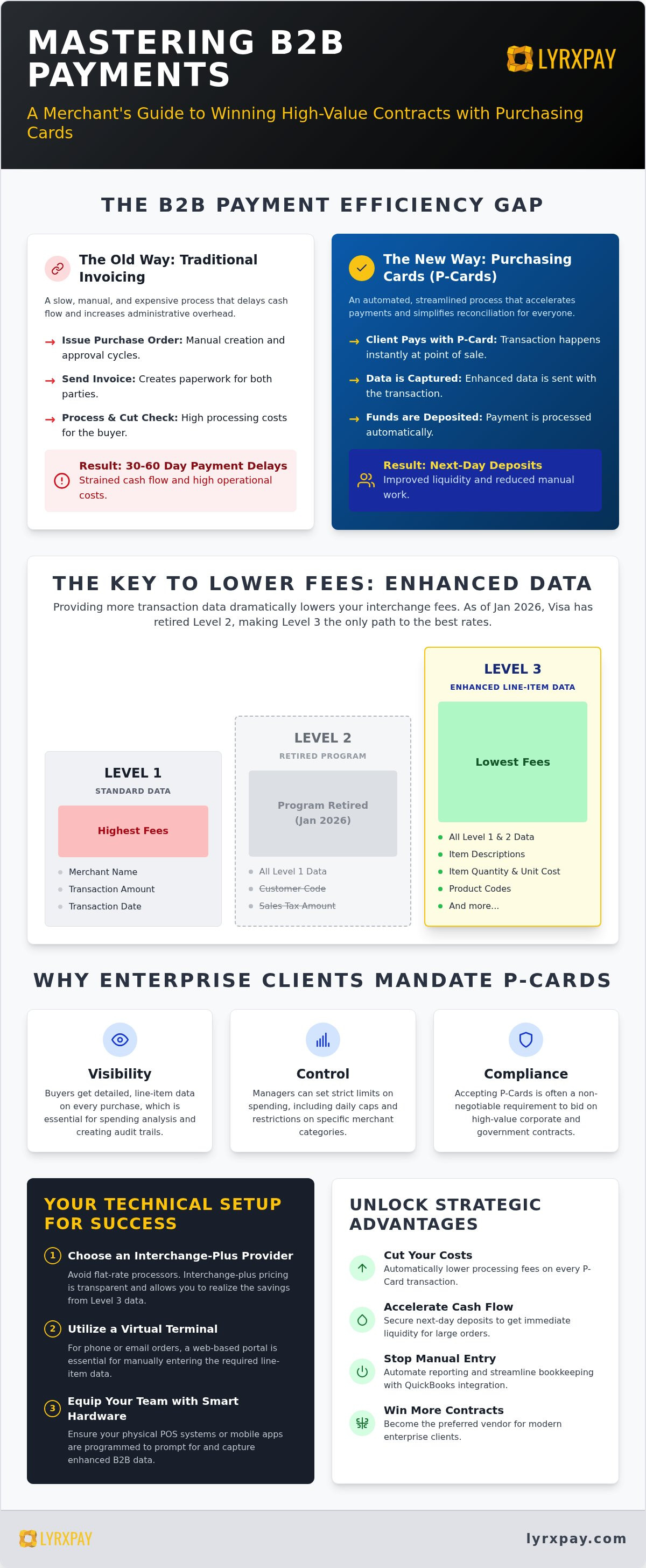
Large corporations and government agencies mandate these cards because they replace the slow, manual Procure-to-Pay cycle. Instead of issuing a purchase order, waiting for an invoice, and cutting a paper check, the buyer simply swipes or enters the card details. For you, the merchant, this means moving away from 30 or 60 day payment terms and getting your funds much faster. It's a win for their efficiency and your liquidity.
The Procure-to-Pay Efficiency Gap
Traditional invoicing is expensive for both parties. Research suggests that processing a single paper check can cost a company significantly more than an electronic transaction when you factor in labor and postage. P-Cards bridge this gap by automating the entire exchange at the point of sale. These cards are most common for transactions under a specific threshold, such as recurring supplies or maintenance services where a full PO process would be overkill. By accepting these cards, you're helping your client reduce their administrative overhead while ensuring you get paid almost instantly.
Why Your B2B Clients Demand P-Card Acceptance
Why do government buyers and enterprise giants insist on this method? It comes down to three pillars: visibility, control, and compliance. Corporate managers can set strict limits on card usage, including daily caps and specific merchant category restrictions. This protects them from fraud and ensures employees stay within budget. Additionally, P-Cards provide the buyer with detailed data on exactly what was bought, when, and from whom, which is essential for audit trails. Many high-value contracts now list P-Card acceptance as a non-negotiable requirement. If you can't process these cards, you might be disqualified from the bidding process. Understanding how to accept purchasing cards is no longer just a luxury; it's a prerequisite for staying competitive in the modern B2B marketplace.
Technical Requirements: How to Set Up Your Business to Accept P-Cards
Setting up your business to process P-Cards requires more than just a standard card reader. To understand how to accept purchasing cards effectively, you must ensure your entire payment stack is built for the specific data needs of enterprise buyers. This isn't just about the transaction; it's about the information that travels with it. If your system doesn't prompt for the right details, the transaction might "downgrade," leading to higher fees and frustrated clients.
Choosing the Right Merchant Account Provider
Many "one-size-fits-all" processors charge a flat rate that seems simple on the surface but hides the true cost of B2B transactions. If you use a flat-rate model, you're likely overpaying for P-Cards because these cards carry higher base costs that can only be offset by providing enhanced data. You need a provider that offers interchange-plus pricing. This model separates the actual cost of the card from the processor's fee, giving you the transparency needed to see where every penny goes. If you want to optimize your margins on these high-value sales, you might consider reaching out to a B2B payment specialist who can configure your account for maximum savings.
Virtual Terminals vs. Physical POS Hardware
Most B2B transactions happen in a "Card Not Present" environment. If you take orders over the phone or via email, a virtual terminal is your best friend. These web-based portals allow you to enter the detailed line-item data required for Level 3 processing without needing a physical card in hand. For retail or warehouse settings, your physical hardware must be programmed to recognize commercial card signatures and prompt for the correct data fields. Even field-based services can benefit from mobile processing apps that support enterprise data. Following the Government Purchase Card Guidelines is a great way to ensure your hardware and software align with federal expectations.
Once your infrastructure is in place, you must focus on the technical verification steps to ensure everything runs smoothly:
- Verify card classes: Confirm with your processor that your account is provisioned to accept all commercial and purchasing card types.
- Select a compatible gateway: Your gateway must be able to capture and transmit Level 2 and Level 3 data fields to the issuing bank.
- Audit PCI compliance: High-limit corporate cards require strict security protocols to handle sensitive data safely.
- Test the transaction flow: Run a test sale to ensure that discount amounts, freight costs, and tax data are reaching the bank correctly.
Lowering Costs with Level 2 and Level 3 Processing Data
If you've ever felt that corporate card fees are eating your profit, you're seeing the impact of "Interchange" in real time. Interchange is the wholesale cost set by card networks like Visa and Mastercard. It accounts for the bulk of your processing fees. When you learn how to accept purchasing cards, the goal isn't just to make the transaction work; it's to qualify for the lowest possible interchange rate. Card networks view transactions with more data as lower risk, and they reward that lower risk with significant discounts.
The amount of information you send with a transaction determines its "Level." Level 1 data is what most consumer transactions use, covering the basic amount, date, and merchant name. Level 2 data adds the tax amount, a customer code, and your merchant tax ID. However, by January 2026, Visa retired its Level 2 program, meaning providing Level 3 data is now the only way to secure the best rates for their commercial cards. Level 3 data is the most detailed, requiring line-item information such as SKUs, quantities, unit prices, and freight costs.
The Financial Impact of Level 3 Optimization
The savings from Level 3 data are substantial and immediate. For example, a corporate card transaction that costs 2.95% + $0.10 with basic Level 1 data could drop as low as 1.95% + $0.10 when you provide Level 3 details. This 1.00% difference adds up fast. For a business processing $500,000 monthly in corporate cards, this optimization results in $5,000 in monthly savings. Strategic business liquidity management tools are significantly more effective when you aren't leaking thousands of dollars each month to avoidable processing overhead. These recovered margins provide the breathing room you need to scale your operations or invest in new contracts.
Automating Data Capture to Save Time
You might worry that entering line-item data for every sale will slow down your team. Manual entry is indeed a bottleneck for growing B2B firms, and it often leads to "data downgrades." A downgrade happens when a required field is missing or formatted incorrectly, causing the transaction to default to the most expensive Level 1 rate. Modern payment gateways eliminate this stress by auto-filling Level 3 fields based on your inventory or transaction history. This automation ensures you get the lowest rate every time without adding hours of administrative work. By removing the friction of manual data entry, you can focus on building relationships with your clients while your payment system handles the heavy lifting of cost optimization.
Best Practices for Managing P-Card Transactions and Reporting
Learning how to accept purchasing cards is the first step, but maintaining a healthy bottom line requires consistent operational habits. Once your gateway is live, the focus shifts to ensuring every transaction qualifies for those lower rates you've worked hard to secure. If your team misses a data prompt or fails to record freight costs correctly, the transaction will downgrade to a higher fee category. This is where managed care for your administrative tasks becomes essential.
Start by implementing a rigorous reconciliation process. High-volume B2B orders often involve partial shipments or backorders, which can complicate payment matching. You must maintain strict documentation for tax and freight data to support your Level 3 claims. It's also vital to monitor your monthly merchant statements for "non-qualified" or "standard" fee labels. These are red flags indicating that your data isn't reaching the bank correctly. If you see these fees, it means your setup needs a technical tune-up to prevent further margin erosion.
Streamlining QuickBooks and Accounting Workflows
Manual data entry is the enemy of efficiency. You can eliminate this bottleneck by integrating level 3 B2B rates into your Quickbooks Invoices directly. This automated sync between your payment gateway and your general ledger ensures that every line item is captured without human error. It simplifies your year-end tax preparation and gives you a real-time view of your true processing costs. When your systems talk to each other, you spend less time on spreadsheets and more time on your craft.
Handling Surcharges and Convenience Fees
Many merchants wonder if they should pass processing costs to the buyer. While surcharging is legal in most states for B2B transactions, you must follow strict card network rules regarding disclosure and caps. Transparency is your greatest tool here. If you decide to absorb the cost, use it as a selling point in your contract negotiations. If you pass it on, ensure the buyer understands that this allows you to maintain your competitive pricing. A clear conversation about fees often strengthens the trust in a professional relationship.
Ready to stop the manual entry and start saving? Connect with our B2B experts at LyrxPay to optimize your reporting and secure next-day deposits today.
Optimizing Your B2B Cash Flow with LyrxPay’s Merchant Solutions
Landing a high-value corporate contract is a major win, but the operational complexity that follows shouldn't slow you down. If you're wondering how to accept purchasing cards without sacrificing your margins or your time, you need a partner who understands the nuance of the B2B payment landscape. At LyrxPay, we specialize in navigating the technical requirements of P-Card processing so you can focus on scale. We don't just provide a gateway; we provide a managed path to better liquidity.
Our solutions are built to solve the specific pains of the B2B merchant. By automating Level 3 data capture, we help you qualify for the lowest possible interchange rates without the administrative headache. This optimization is paired with next-day deposits, ensuring that your available cash flow matches your sales volume. When your funds hit your account faster, you have the agility to reinvest in inventory or fulfillment immediately. We also ensure your payment stack links directly to your QuickBooks environment, creating a unified financial workflow that eliminates manual reconciliation errors.
Why LyrxPay is the Preferred Ally for B2B Merchants
We take a "concierge" approach to merchant services. This means we do the heavy lifting of technical integration and security protocols for you. Our team proactively audits your processing statements to find optimization gaps where you might be overpaying. We focus specifically on how to lower merchant fees through data-driven adjustments. You'll work with Texas-based experts who understand the national B2B market and are committed to your operational health. We aren't just another service provider; we're a reliable ally invested in your long-term success.
Ready to Win More B2B Business?
Accepting P-Cards with LyrxPay turns a technical hurdle into a powerful competitive edge. When you can tell a government agency or a Fortune 500 client that you're fully optimized for their procurement cards, you become the easier choice. It's time to move toward an all in one business financial solution that supports your growth goals. Let us help you streamline your back office and protect your margins. Contact us today for a free, no-obligation B2B processing audit and see exactly where we can save you time and money.
SCALE YOUR B2B OPERATIONS WITH CONFIDENCE
Accepting P-Cards doesn't have to be a technical burden or a drain on your margins. By mastering Level 3 data optimization and streamlining your accounting workflows, you transform a complex requirement into a powerful competitive advantage. You've now seen exactly how to accept purchasing cards while protecting your profitability, ensuring that every government or corporate contract you win is as lucrative as possible.
It's time to stop the manual data entry and start seeing the true potential of your business. With expert QuickBooks and Xero data integration and specialized Level 3 optimization, we handle the heavy lifting so you can focus on your craft. You deserve the security of next-day deposits and the clarity of transparent processing. Get a Free B2B Processing Audit from LyrxPay Today and take the first step toward a more efficient, profitable future. Your growth is our mission; we're ready to help you lead the way.
Frequently Asked Questions
What is the difference between a corporate card and a purchasing card?
A corporate card is generally issued to employees for travel and entertainment expenses. In contrast, a purchasing card is a specialized procurement tool designed for business supplies and services. P-Cards allow for the transmission of line-item data, which helps merchants qualify for lower interchange rates. While both are commercial products, P-Cards are the primary vehicle for high-volume B2B transactions where detailed reporting is required by the buyer's accounting department.
Do I need special equipment to accept purchasing cards?
You don't necessarily need a physical credit card terminal to understand how to accept purchasing cards effectively. Most B2B merchants use a virtual terminal or a payment gateway that supports Level 3 data fields. Your current POS hardware might work if it's programmed for commercial prompts, but the software is the critical component. It must be capable of capturing and transmitting line-item details like SKUs and tax amounts to the issuing bank.
Why are the fees higher for purchasing cards if I don’t provide Level 3 data?
Card networks view high-limit commercial transactions as higher risk because of the potential for fraud or disputes. Providing Level 3 data reduces this perceived risk by offering total transparency into the purchase. As of January 2026, Visa's Commercial Enhanced Data Program rewards this transparency with lower rates. Without this data, your transaction "downgrades" to a standard rate, which can be up to 1.00% higher than an optimized B2B transaction.
Can I accept purchasing cards over the phone or via email?
Yes, you can accept these cards over the phone or via email using a secure virtual terminal. This is classified as a "Card Not Present" transaction. Since you can't swipe the card, you'll manually enter the card details along with the required Level 3 information. It's the most common way B2B firms handle orders. Using a secure gateway ensures you stay PCI compliant while protecting your client's high-limit account data from potential breaches.
What specific data is required for Level 3 processing?
Level 3 processing requires much more than just the total sale amount. You must provide line-item details for every product or service sold. This includes specific SKUs, item descriptions, quantities, unit prices, and commodity codes. You'll also need to break out freight or shipping charges and the exact sales tax amount. Capturing this granular data is what allows the transaction to qualify for the lowest possible interchange rates under current network rules.
How does QuickBooks integration help with P-Card acceptance?
Integrating your payment gateway with QuickBooks eliminates the need for manual data entry, which is a major bottleneck for growing firms. It ensures that the line-item data required for Level 3 rates is automatically synced with your invoices. This automation prevents human error and "data downgrades" that lead to higher fees. It also simplifies your bookkeeping by providing real-time visibility into your processing costs and simplifying your year-end tax preparation.
Is there a limit to how much a client can charge on a P-Card?
The spending limit on a P-Card is determined by the issuing bank and the client's internal procurement policies. These limits are typically much higher than consumer credit cards to accommodate large business orders. However, buyers often place "velocity limits" or merchant category restrictions on the cards. This means an employee might be able to spend $50,000 on industrial supplies but be blocked from using the same card at a restaurant or retail shop.
How long does it take for P-Card funds to deposit into my business account?
While many processors take two to three business days to settle funds, the timing depends on your merchant service provider. For B2B merchants managing large orders, liquidity is a top priority. We focus on providing next-day deposits to ensure your cash flow keeps pace with your sales volume. This speed allows you to pay suppliers and fulfill new contracts without waiting for traditional banking delays to clear your hard-earned funds.