
QuickBooks Payment Processing Integration: The 2026 Guide to Lower Fees

Why are you letting "native" processing fees take a 2.9% cut of your revenue just for the convenience of an invoice button? You've likely noticed that as your business grows, the cost of simply getting paid starts to feel like a tax on your success. With QuickBooks Online implementing a 15-25% price increase in May 2026, a smarter QuickBooks payment processing integration is no longer optional; it's a necessity for your margins. It's frustrating to watch transaction fees eat your profit while you still spend hours on manual data entry and wait days for deposits to hit your bank account.
We believe you shouldn't have to sacrifice your profit for the sake of organization. This guide will show you how to integrate high-performance processing to slash your costs and automate your entire bookkeeping workflow. You don't have to choose between wholesale rates and seamless data syncing. We'll walk through the steps to secure better processing terms, implement automated reconciliation, and achieve next-day deposit availability. You'll learn exactly how to reclaim your time and liquidity, allowing you to focus on leading your business instead of managing its obstacles.
Key Takeaways
- Discover how a proper QuickBooks payment processing integration acts as a direct bridge between your merchant account and general ledger to eliminate manual data entry.
- Learn the difference between Intuit’s flat-rate "convenience tax" and wholesale interchange-plus models that can significantly reclaim your margins.
- Understand why settlement speed is vital and how to transition from 3-5 day waiting periods to reliable next-day deposit availability.
- Follow a clear two-step process to audit your current fee structure and select a provider that offers native plugin compatibility.
- Explore the concierge approach to integration that handles technical heavy lifting while providing personalized bookkeeping and payroll support.
QuickBooks Payment Processing: Why Integration is Non-Negotiable in 2026
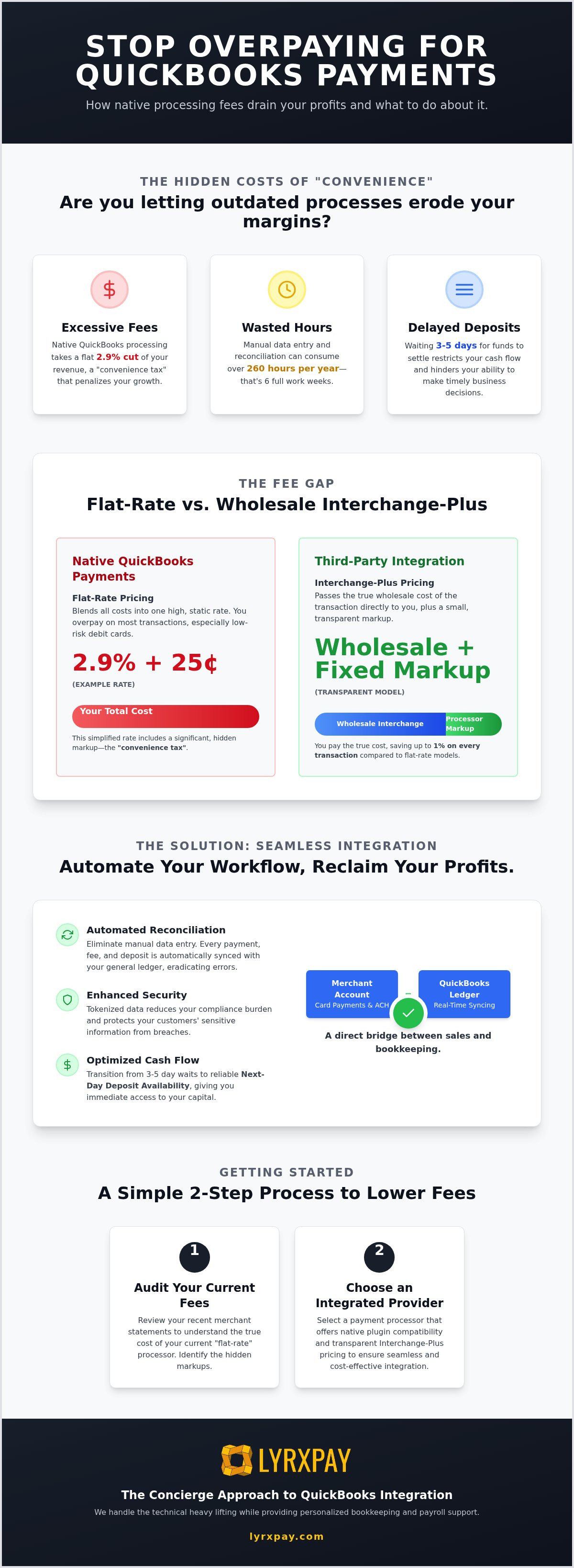
In 2026, efficiency isn't just a goal; it's the baseline for survival. Think of your QuickBooks payment processing integration as a high-speed digital bridge. It connects your payment processor directly to your general ledger, ensuring that every cent is accounted for the moment it moves. Without this connection, you're essentially running two separate businesses: one that sells and one that spends all its time trying to figure out what happened. Are you tired of the disconnect?
Hand-keying invoices is a liability you can't afford. Every manual entry is an opportunity for a typo to cost you thousands in lost revenue or tax penalties. If you're still typing numbers into a screen in 2026, you're creating a backlog of "administrative debt" that eventually comes due during an audit. Real-time reconciliation gives you the financial visibility you need to steer your company with confidence instead of guesswork.
The Real Cost of Manual Reconciliation
Let's look at the math. If you or an employee spends just five hours a week on manual data entry and reconciliation, that scales to 260 hours over a single year. That's over six full work weeks spent on repetitive tasks that a machine can do in seconds. Beyond the payroll cost, the psychological toll is heavy. Business owners often feel buried under a mountain of paperwork, which pulls their focus away from the craft they love. This "hidden tax" on your time is often more expensive than the transaction fees themselves.
Non-integrated systems carry specific risks that integration solves:
- Duplicate entries: These inflate your revenue on paper and lead to overpaying taxes.
- Missed invoices: Uncollected debt often goes unnoticed until it's too late to recover.
- Audit vulnerability: Inconsistent data between your bank and your books is a major red flag for regulators.
How Integration Protects Your Bottom Line
When a customer clicks "pay" on an invoice, your accounts receivable should update instantly. This immediate visibility allows you to make better decisions about inventory, hiring, and expansion because you know exactly what's in the bank. Integration also simplifies your math by providing automated bookkeeping for merchants, where fees are calculated and recorded automatically. If your systems talk to each other, you don't have to spend your weekends playing detective with your bank statements.
Security is the final piece of the puzzle. Modern QuickBooks payment processing integration uses tokenized data, which means sensitive cardholder information never actually touches your local server. This reduces your compliance burden and protects your reputation from data breaches. If you want to stop defending your time and start growing your margins, moving away from manual processes is the first step toward a healthier business.
Third-Party vs. Native QuickBooks Payments: Uncovering the Fee Gap
Choosing the default payment option in your software feels easy, but that ease comes with a heavy price tag. Most business owners don't realize they're paying a "convenience tax" of up to 1% on every single transaction. While Intuit markets its native payments as the only seamless choice, a third-party QuickBooks payment processing integration offers the same automation without the inflated flat-rate markup. Why pay for a brand name when you could be keeping that margin for your own growth?
There's a common myth that third-party integrations are less stable or prone to breaking. In reality, modern cloud-based plugins are incredibly robust. They use the same secure APIs as native tools but offer far more flexibility in how your money is handled. If you're concerned about reliability, remember that specialized processors often provide more dedicated support than a massive software conglomerate ever could.
Understanding Interchange-Plus vs. Flat-Rate
Interchange is the baseline cost of a transaction, set by the card networks like Visa and Mastercard. It's essentially the wholesale price of moving money. Flat-rate pricing, which native processors favor, blends these varied costs into one high, static number. This sounds simple, but it hides significant markups. If a customer uses a low-risk debit card with a tiny interchange fee, the flat-rate processor pockets the massive difference instead of passing those savings to you.
When you switch to an interchange-plus model, you pay the exact wholesale cost plus a small, transparent margin. This ensures your low fee credit card processing scales fairly as your business volume increases. It's the difference between buying at retail prices and getting a professional discount. If you want to see the real numbers behind your current statements, you can request a transparent fee audit to identify exactly where your margins are leaking.
The Power of Level 3 Data for B2B
For businesses in professional services, wholesale, or medical fields, the potential savings go even deeper. B2B transactions often qualify for significantly lower rates if you provide extra detail, known as Level 3 data. This includes line-item information like quantities, product codes, and tax amounts. Most native processors simply don't support this level of complexity, forcing you to pay higher "standard" rates on every corporate card swipe.
A specialized QuickBooks payment processing integration can automatically pass this data through to the networks, slashing your interchange costs at the source. If you're processing large invoices, this isn't just about saving pennies; it's about reclaiming thousands of dollars in annual profit. You deserve a partner who advocates for your bottom line rather than one that benefits from your lack of data.
Optimizing Cash Flow with Next-Day Deposits and ACH
Cash flow is the lifeblood of your operation. While lowering fees is a critical part of the equation, the speed at which that money hits your bank account is equally vital to your success. A high-performance QuickBooks payment processing integration shouldn't just save you money; it should give you immediate access to your capital. Why are you letting a processor hold your hard-earned revenue for nearly a week while you wait for settlement?
Many traditional processors trap your funds in a settlement gap for three to five days. This delay isn't just an inconvenience. It's a direct threat to your ability to meet payroll or restock inventory during peak periods. By choosing a partner that prioritizes next-day liquidity, you're effectively shortening your cash cycle and strengthening your balance sheet. Sophisticated business liquidity management tools only work effectively when they have real-time data and fast settlement to act upon. If your money is stuck in "processing," those tools are essentially flying blind.
Maximizing Liquidity Through Faster Settlement
Next-day deposits change the way you manage your daily operations. If you're processing a large volume of transactions on a Thursday, having that cash available on Friday morning allows you to make strategic moves before the weekend begins. You can reinvest in growth more aggressively, pay vendors early to secure discounts, or simply maintain a healthier cash cushion. This transition from "waiting for funds" to "deploying capital" is a massive advantage for scaling businesses. It removes the friction that often stalls momentum and allows you to operate with the confidence that your bank balance reflects your actual sales.
Integrated ACH: The Silent Hero of B2B Payments
While credit cards are convenient, they're often the most expensive way to get paid. Integrated ACH (Automated Clearing House) is the most efficient alternative for handling large B2B invoices. In 2026, the shift toward digital "e-checks" has accelerated because they cost cents per transaction rather than a percentage of the total invoice. When you use a QuickBooks payment processing integration that includes ACH, the entire process is automated. Your customers pay directly from their bank accounts, and the system reconciles the payment without you lifting a finger.
Beyond the cost savings, ACH is inherently more secure than paper checks. You don't have to worry about "the check is in the mail" syndrome or the growing risk of mail fraud. Bank-to-bank transfers are encrypted and follow strict Nacha fraud detection protocols, which were further strengthened in early 2026. It's a faster, safer, and significantly cheaper way to manage your receivables while keeping your bookkeeping perfectly in sync.
Implementation Guide: Connecting Your Merchant Account to QuickBooks
Transitioning to a more efficient system doesn't have to be a technical headache. While native prompts might suggest that only their own services work perfectly, a professional QuickBooks payment processing integration is designed to be just as seamless. The goal is to move from a state of manual intervention to a "one-click" workflow that protects your time and your data. By following a structured approach, you can bridge the gap between your merchant account and your ledger without disrupting your daily operations.
The first step is a thorough audit of your current processing volume and fee structure. You can't improve what you haven't measured. Once you identify where your margins are leaking, you can select a merchant service provider that offers a native QuickBooks plugin. This ensures that the data flows bi-directionally, updating your invoices and your bank records simultaneously. If you're ready to stop overpaying for convenience, you can get a custom integration plan that fits your specific business model.
Mapping Your Chart of Accounts
Accuracy in your ledger depends on how you map your accounts during the initial setup. You should never lump your processing fees in with your gross income. Instead, configure your integration to send transaction fees to a dedicated expense account while the full invoice amount hits your revenue. This provides a clear picture of your true margins. Use the "Undeposited Funds" account in QuickBooks as a temporary holding tank. This allows you to batch multiple transactions into a single bank deposit, making your monthly reconciliation much cleaner.
Don't forget about sales tax. A common mistake is failing to map tax collected to the specific tax agency accounts within QuickBooks. Ensure your sync logic recognizes tax as a liability rather than income. This simple step prevents major headaches during tax season and ensures your financial reporting remains beyond reproach.
Ensuring a Secure Data Sync
Security is a shared responsibility. In 2026, all third-party plugins must adhere to PCI DSS 4.0 standards, which mandate stricter multi-factor authentication and continuous monitoring. When you integrate your merchant account, look for a provider that uses advanced tokenization. Tokenization is the process of replacing sensitive data with a unique identifier for secure processing. This ensures that actual cardholder numbers never touch your local server or stay stored in your QuickBooks file. By keeping sensitive data "off the books," you significantly reduce your liability and keep your customers' trust intact.
Once the technical mapping is complete, conduct a test transaction to verify the reconciliation logic. Check that the payment posts to the correct invoice, the fees are recorded in the right expense category, and the remaining balance matches your bank statement. After you've confirmed the sync is perfect, train your team on the new workflow. Moving to a single-click process won't just save them time; it will eliminate the stress of manual errors forever.
LyrxPay: The Concierge Approach to QuickBooks Integration
LyrxPay isn't just another software vendor. We're your advocate in an industry that often thrives on confusion and complex fee structures. While massive corporations leave you on hold for hours, we take a different path. Our team handles all the technical heavy lifting of your QuickBooks payment processing integration, ensuring that your system is configured correctly from day one. We believe you should spend your time growing your business, not troubleshooting API connections or mapping accounts.
Our approach combines the financial advantages of wholesale rates and next-day deposits with the personal touch of a managed service. You get the best of both worlds: the speed of modern technology and the reliability of human experts who understand your operational health. Because we also offer integrated payroll and bookkeeping solutions, we see the bigger picture. We don't just process a transaction; we ensure that transaction flows perfectly through your entire financial ecosystem. It's a level of managed care that generic processors simply can't match.
Beyond the Transaction: A Partnership for Growth
Many providers stop at the "sync" button. We start by auditing your current merchant statements to find every hidden fee and markup. This transparency is the foundation of our partnership. If there's a way to save you money or speed up your cash flow, we'll find it. Our concierge support model means you have a direct line to experts who care about your success. It's why specialized merchant services for medical offices and professional firms often choose LyrxPay over generic, impersonal alternatives. We treat your business like the unique entity it is, not just a line on a spreadsheet.
Ready to Streamline Your Operations?
The path to lower fees and better liquidity is clear. By moving away from the "convenience tax" of native processors and embracing a high-performance QuickBooks payment processing integration, you reclaim your margins and your time. You've seen how automated reconciliation and next-day deposits can transform your daily workflow. Now, it's time to put those tools to work for you. We take pride in a culture of integrity and straightforwardness, positioning ourselves as the defender of your time and resources.
We're here to simplify your life and help you focus on your craft. If you're ready to see exactly how much you can save and how fast your cash flow can move, we're ready to show you. Don't let another month of excessive fees and manual entry hold you back. Get a Free QuickBooks Integration Audit from LyrxPay today and experience a partnership built on your results.
RECLAIM YOUR MARGINS AND YOUR TIME
You've worked too hard to build your business to let outdated fee structures and manual work hold you back. Moving to a high-performance QuickBooks payment processing integration isn't just a technical upgrade; it's a strategic shift toward protecting your bottom line. By moving away from expensive flat-rate models and choosing wholesale interchange-plus pricing, you ensure that your revenue stays where it belongs: in your bank account. It's about making your software work for you, rather than the other way around.
Remember that settlement speed is just as vital as the rate itself. Next-day deposits give you the liquidity to reinvest in your growth without waiting for a processor to release your funds. With expert QuickBooks sync support, the technical heavy lifting is handled for you, allowing you to focus on your craft instead of your ledger. It's time to stop settling for the default and start advocating for your own operational health. You're one step away from a more efficient, profitable future.
Stop Overpaying for QuickBooks Payments – Get Your Free Fee Audit
We're here to help you clear the path to a healthier business. Let's get started on your integration today.
Frequently Asked Questions
Can I use a third-party payment processor with QuickBooks Online?
Yes, you can absolutely use a third-party provider. Modern cloud-based plugins create a robust QuickBooks payment processing integration that works just as smoothly as the native option. This allows you to keep your existing software while benefiting from much more competitive transaction rates and personalized support. You aren't locked into the Intuit ecosystem just because you use their accounting software.
How much can I actually save by switching from QuickBooks Payments?
While exact savings depend on your specific transaction volume and card mix, moving from flat-rate pricing to a wholesale model often reclaims a significant portion of your margin. By paying the actual interchange cost plus a transparent margin, you avoid the high markups hidden in "all-in-one" pricing plans. This shift ensures you only pay for the specific types of cards your customers actually use.
Will my existing invoices automatically sync with a new processor?
Your existing invoices will stay perfectly in sync once the integration is active. When you send an invoice through QuickBooks, the system adds a secure payment link generated by your new processor. Once your customer pays, the integration automatically marks that specific invoice as paid and records the transaction in your ledger without any manual intervention on your part.
Is it difficult to set up a third-party payment integration?
The setup process is straightforward when you have the right partner to guide you. While the initial mapping of your chart of accounts requires a methodical approach, our team handles the technical heavy lifting for you. This ensures your QuickBooks payment processing integration is configured correctly from day one, allowing you to move into a "one-click" workflow without any technical stress.
What is the difference between integrated and non-integrated processing?
Integrated processing acts as a digital bridge that automatically updates your books the moment a sale occurs. Non-integrated systems require you to manually type transaction details into QuickBooks at the end of the day or week. This manual "hand-keying" is a major liability because it leads to human errors, duplicate entries, and hours of unnecessary administrative debt that pulls you away from your craft.
Does LyrxPay support QuickBooks Desktop as well as Online?
We provide full support for both QuickBooks Online and Desktop versions for 2026. Whether you use the cloud-based platform or a local installation like Premier or Enterprise, our integration tools ensure your payment data and bookkeeping stay perfectly aligned. We understand the specific sync requirements for each version to prevent data corruption and ensure a seamless flow of information.
How do next-day deposits work with QuickBooks integration?
Next-day deposits work by accelerating the settlement cycle between your processor and your bank. Once your daily batch closes, the funds are settled and hit your account the following business day. The integration then matches these deposits to your bank feed in QuickBooks, making the reconciliation process nearly instantaneous and giving you the liquidity needed to manage payroll or inventory with confidence.
What happens if I need help with my reconciliation after switching?
You won't be left to figure out complex accounting issues alone. Our concierge support model includes access to bookkeeping and payroll experts who can help you navigate any reconciliation questions that arise. We act as an extension of your team to ensure your financial records remain accurate, your books stay balanced, and your cash flow remains fully optimized.