
QuickBooks Payroll Integration: 2026 Strategic Guide

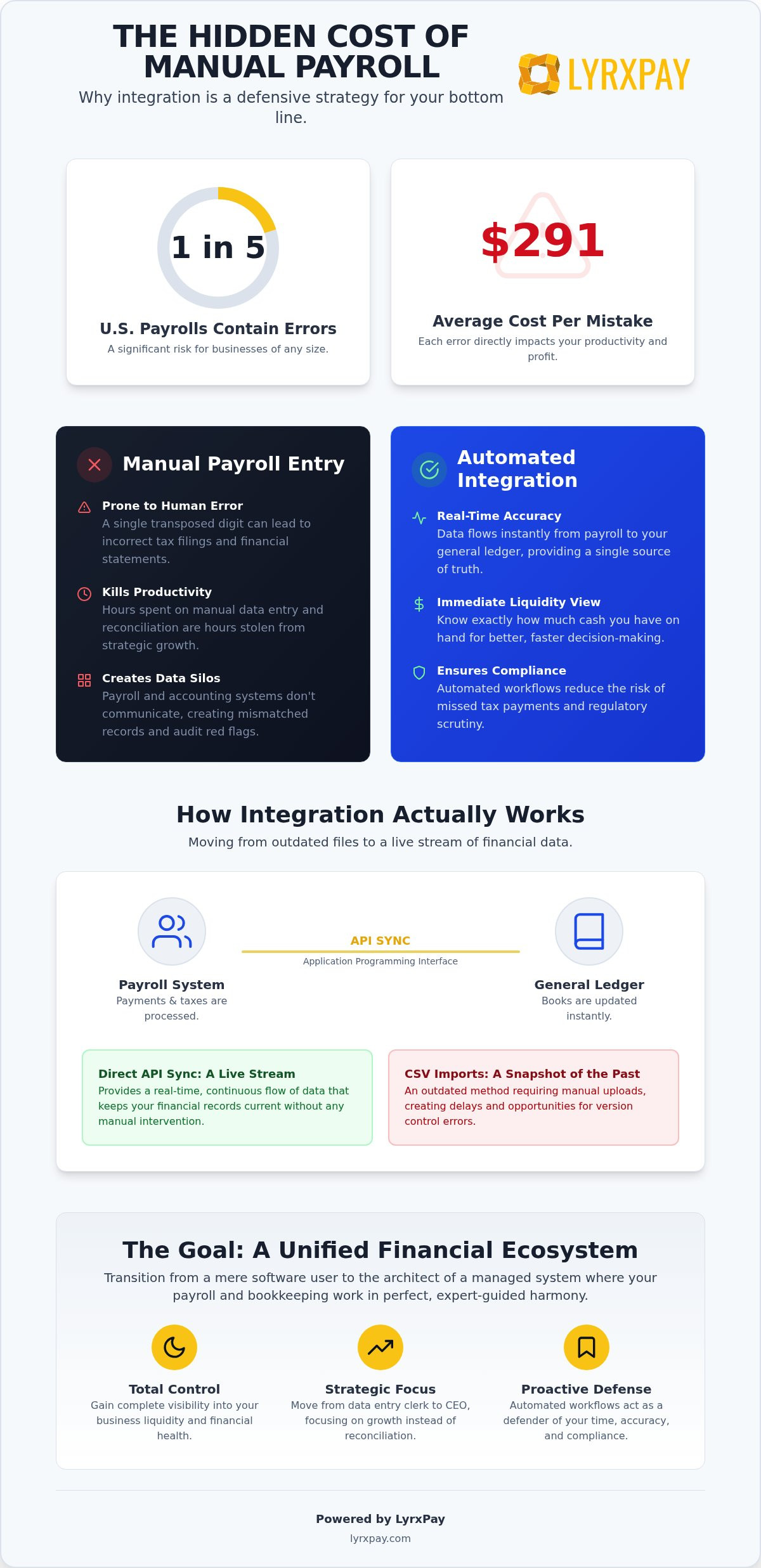
Did you know that one in five U.S. payrolls contains errors, and each mistake costs an average of $291 to correct? For a growing business, these aren't just numbers on a spreadsheet; they're hours of lost productivity and unnecessary stress. You likely started your business to build something great, not to spend every Tuesday night manually entering data or sweating over bank reconciliations. Integrating your payroll with your financial management system is no longer just a convenience. In 2026, it's a defensive strategy to protect your time and your bottom line.
We understand that the thought of syncing your entire financial ecosystem can feel overwhelming, especially with new regulations like the Overtime and Benefit Balance Act complicating your reporting. If you're tired of the manual grind and the constant fear of incorrect tax filings, you're in the right place. This guide from LyrxPay will show you how to eliminate manual entries and create a seamless flow between your staff's hours and your general ledger. We'll explore modern workforce management solutions, compare top third-party options for your existing accounting software, and ensure your business stays compliant with the latest federal mandates.
Key Takeaways
- Stop paying the "hidden tax" of manual entry by automating the flow of data from employee payments directly to your general ledger.
- Learn why integrating payroll with QuickBooks via direct API sync is superior to outdated CSV imports for maintaining real-time financial accuracy.
- Compare the convenience of native "in-house" payroll solutions against specialized third-party providers to find your ideal cost-to-value ratio.
- Audit your Chart of Accounts to create specific sub-accounts for payroll tax liabilities, ensuring you're never caught off guard during tax season.
- Transition from a mere software user to a managed financial ecosystem where your payroll and bookkeeping work in perfect, expert-guided harmony.
The Hidden Costs of Manual Payroll Entry in QuickBooks
Many business owners view manual data entry as a "free" task because they handle it themselves. In reality, this is a hidden tax on your growth. When we discuss integrating payroll with QuickBooks, we are describing the automated flow of data from the moment a payment is triggered until it reaches its final destination in your general ledger. Without this connection, you're essentially running two separate businesses that don't speak the same language. This lack of communication creates a dangerous gap in your financial oversight.
Modern payroll functions encompass everything from tax withholding to benefits administration. When these complex tasks live in a data silo, the risk of mismatched records skyrockets. If your bank statement shows one total and your QuickBooks file shows another, you aren't just facing a minor headache. You're looking at a potential audit red flag. Mismatched payroll and tax records are one of the fastest ways to trigger regulatory scrutiny, especially with the increased compliance complexity brought by the Overtime and Benefit Balance Act of 2025.
Why Manual Reconciliation is a Growth Killer
Every hour you spend squinting at spreadsheets is an hour stolen from your strategic goals. This administrative fatigue doesn't just tire you out; it breeds human error. A single transposed digit in a tax liability entry can ripple through your quarterly financial statements, leading to incorrect profit reports and missed tax deadlines. The psychological stress of balancing the books every pay cycle creates a bottleneck that prevents you from scaling. If you're stuck in the weeds of reconciliation, you can't see the horizon of your business. You become a data entry clerk instead of a CEO.
The Goal: A Unified Financial Ecosystem
Success in 2026 requires a single source of truth. By effectively integrating payroll with QuickBooks, you gain immediate visibility into your business liquidity. You no longer have to wait days for a bookkeeper to catch up to know how much cash you actually have on hand. Automated workflows act as a proactive defender of your time, ensuring that data moves accurately and instantly. This unified approach turns your accounting software from a historical record into a real-time tool for cash flow management. It's about moving from a state of constant catching up to a state of total control over your financial health.
How Payroll-to-QuickBooks Integration Actually Works
At its core, the connection between your payroll provider and your accounting software relies on an API, or Application Programming Interface. Think of an API as a digital translator that allows two different software platforms to speak the same language in real-time. When you're integrating payroll with QuickBooks, this API ensures that every dollar paid to an employee or a tax agency is instantly reflected in your books. This is vastly superior to the old method of CSV imports. While CSV files are mere snapshots of the past that require manual uploading, a direct sync provides a live stream of data that keeps your financial records current without human intervention.
The industry is rapidly evolving, with modern technology transforming payroll with AI and sophisticated automation to catch discrepancies before they hit your ledger. This technological shift means your software can now recognize patterns and flag unusual spikes in labor costs or tax liabilities. If you want to ensure your system is configured for maximum efficiency, seeking a concierge-style setup for your financial tools can save you from the trial-and-error phase of software implementation.
The Mechanics of a Successful Sync
Once the connection is established, the software translates raw payroll data into detailed journal entries or individual checks. This process ensures that payroll tax liabilities are recorded the moment they're incurred, rather than weeks later during reconciliation. It also integrates your merchant services flow, allowing you to see how labor costs impact your daily liquidity. By automating these movements, you eliminate the risk of forgetting to record a specific tax payment or benefits deduction, keeping your cash flow reporting honest and accurate.
Mapping Your General Ledger
The most critical step in the setup process is data mapping. You must tell the software exactly which categories in your payroll system correspond to the accounts in your QuickBooks file. This includes directing gross pay to expense accounts and withholding amounts to liability accounts. General Ledger Mapping is the blueprint for financial accuracy. Beyond simple paychecks, you must map complex deductions such as:
- Health insurance premiums and employer contributions
- Retirement plan deferrals like 401(k) or SIMPLE IRAs
- Legal garnishments or charitable contributions
To get the most out of your data, utilize "class tracking" during the mapping phase. This allows you to tag payroll expenses by department or project. Instead of seeing one giant lump sum for "Wages," you can see exactly how much you're spending on sales versus operations, providing the granular insights needed for smarter scaling decisions.
Native QuickBooks Payroll vs. Third-Party Integrated Solutions
Deciding between a native Intuit solution and an external provider is one of the most critical choices you'll make for your operational health. Native tools offer the allure of a single dashboard, but is that "one-click" promise worth the lack of personalized advocacy? When you're integrating payroll with QuickBooks, you aren't just choosing software; you're choosing a service model that either supports your growth or leaves you to figure out the technical hurdles alone. If you've felt like just another ticket number in a massive system, it's time to rethink the bundled approach.
Cost structures vary significantly between these two paths. Native options typically rely on high monthly subscriptions that scale up quickly as you add employees. In contrast, many independent providers offer transaction-based fees or lower-cost bundles that better suit businesses with fluctuating staff numbers. Beyond the price tag, consider the flexibility of your merchant services. A dedicated provider can often secure lower processing rates and more responsive service that aren't available through a generic, bundled software package. If you prioritize control over your margins, integrating payroll with QuickBooks through a specialized partner provides the transparency you need.
When to Choose a Third-Party Payroll Partner
If you've ever spent hours on hold waiting for a generic support agent, you know the value of a concierge-managed service. A third-party partner acts as your advocate, ensuring your merchant and payroll needs are met with personal attention. These providers often grant access to more sophisticated liquidity management tools that go beyond basic bookkeeping. If your business requires next-day deposits or complex benefit tracking, a dedicated partner provides the managed care your administrative tasks deserve, allowing you to focus on your craft.
The Myth of "Easier" Native Integration
Many owners assume that only native Intuit tools can achieve a seamless sync. This is a misconception that often leads to overpaying for features you don't need. Modern APIs have leveled the playing field, and in many cases, an expert-led integration can provide more granular data than the standard native setup. By working with a specialist, you can customize your data mapping to capture specific project costs or departmental spends that native tools might lump together. When you compare the long-term ROI of lower fees and curated support against a rigid bundled software, the specialized path often emerges as the clear winner for sustainable growth.
Preparing Your Chart of Accounts for Seamless Integration
Before you flip the switch on your new automation, you must ensure your digital foundation is solid. A messy Chart of Accounts is the most common reason for sync failures. Have you looked at your account list recently? If it's cluttered with redundant or outdated categories, your data will end up in the wrong place. Successfully integrating payroll with QuickBooks requires a clean slate where every dollar has a clearly defined home. Think of this preparation as the "pre-flight check" for your financial ecosystem.
Start by auditing your existing accounts. Many businesses make the mistake of using a single "Payroll" account for every transaction. This is a recipe for confusion. Instead, create specific sub-accounts for federal withholding, state unemployment, and social security. By isolating these liabilities, you avoid "tax season surprises" because you can see exactly what you owe at any given moment. Once your accounts are ready, verify that your employee names and identifiers in your payroll system are identical to your QuickBooks records. Even a small discrepancy in a name can cause a reconciliation nightmare that takes hours to untangle.
Step-by-Step Account Mapping Checklist
To ensure a flawless connection, follow this sequence to validate your settings. If your accounts aren't mapped correctly from the start, your reports will be fundamentally flawed. Use this list as your guide:
- Confirm that "Wages" and "Payroll Tax Expense" accounts are active and categorized as expenses.
- Set up a "Payroll Liabilities" account to track unpaid tax obligations until they're remitted.
- Verify that your bank account links are authorized and verified for ACH processing.
- Perform a "test sync" with a single pay period to validate that every line item lands in the correct account.
Avoiding Common Integration Pitfalls
The most frequent error we see is the danger of "double-counting" expenses. If your bank feed is active, it might import the lump sum withdrawal while your payroll sync simultaneously imports the detailed breakdown. If you don't match these entries correctly, your expenses will appear twice as high as they actually are, skewing your profit and loss statements. Managing this requires a methodical approach to reconciliation every pay period. If you need to make manual adjustments, do so through journal entries rather than changing the synced data to avoid breaking the automated link. For business owners who want to bypass these technical headaches entirely, our expert QuickBooks integration services provide the managed care needed to keep your general ledger pristine throughout the fiscal year.
Beyond the Sync: LyrxPay’s Managed Financial Workflow
Software alone isn't a strategy. While the technical steps of integrating payroll with QuickBooks are manageable, the ongoing optimization of that system is where true business health is found. LyrxPay acts as the concierge for your entire financial ecosystem, ensuring that your payroll, bookkeeping, and payment processing aren't just connected, but are actually working to protect your margins. By adopting all-in-one business financial solutions, you move away from the "do-it-yourself" struggle toward a state of managed care.
Why settle for a generic software bundle when you can have a dedicated ally? We take the heavy lifting out of the initial configuration, auditing your data mapping and ensuring your bank links are secure. This approach doesn't just save you from technical errors; it improves your overall liquidity by aligning your labor costs with your merchant processing flow. When these systems are in sync, you gain a level of clarity that allows for faster, more confident decision-making. If you've been struggling to see the "big picture" of your finances, a managed workflow is the missing piece of the puzzle.
Advocacy in Action: Why LyrxPay is Your Ally
We believe in radical transparency. Our mission is to remove the operational obstacles that keep you from scaling. This starts with a deep dive into your current expenses to find opportunities to lower merchant fees and streamline your overhead. When you have an expert-led team defending your resources, you gain the peace of mind needed to lead your company with confidence. We don't just point out problems; we resolve them so you don't have to. This sense of advocacy means we're constantly looking for ways to protect your time and your bottom line, acting as a proactive partner rather than a passive vendor.
Next Steps: Moving from Manual to Managed
Ready to reclaim your Tuesday nights? The transition from manual data entry to a managed workflow begins with a simple consultation. During this session, we'll design a custom plan for integrating payroll with QuickBooks tailored to your specific Chart of Accounts and reporting needs. We look at your business as a whole, not just a series of disconnected software tickets. Within the first 30 days of a LyrxPay partnership, you'll see a dramatic reduction in administrative hours and a clearer picture of your real-time cash flow. You'll finally have the freedom to stop being a data entry clerk and start being a visionary again. LyrxPay doesn’t just provide tools; we execute the strategy that allows you to focus on your craft.
RECLAIM YOUR TIME AND SCALE WITH CONFIDENCE
Integrating payroll with QuickBooks is more than a technical upgrade; it's a commitment to your company's operational health. By moving away from manual data entry and auditing your Chart of Accounts, you protect your business from the administrative fatigue and reconciliation errors that stall growth. You've seen how a precise API sync transforms your ledger into a real-time tool for strategic decision-making.
If you're ready to stop juggling data silos and start leading with clarity, a managed approach is the solution. LyrxPay provides concierge-level QuickBooks support alongside transparent, lower-fee merchant services. We prioritize your liquidity with next-day deposits for ACH and credit card processing, ensuring your capital is always where it needs to be. Let LyrxPay manage your QuickBooks integration today and experience the security of a professional partnership. Your focus belongs on your craft, not your spreadsheets.
Frequently Asked Questions
How do I sync my payroll with QuickBooks Online?
You connect the two systems by navigating to your payroll provider's "Integrations" or "Accounting" tab and selecting QuickBooks Online. After a secure login and authorization, you'll map your accounts to ensure data flows to the right categories. This direct API link ensures that every pay run triggers an automatic update in your ledger, saving you from manual entry every month.
Can I integrate third-party payroll services with QuickBooks?
You certainly can. Most modern payroll platforms are designed to work with QuickBooks through direct API connections. This flexibility allows you to choose a provider that offers better merchant rates or more personalized support without sacrificing the accuracy of your accounting software. Integrating payroll with QuickBooks via a third party is a standard and highly effective industry practice for growing businesses.
What is the best way to map payroll accounts in QuickBooks?
The most effective method is to create specific sub-accounts in your Chart of Accounts for different types of liabilities. Map your gross wages to an expense account while directing tax withholdings and employer taxes to separate liability accounts. This granular mapping prevents common bookkeeping errors by giving you a clear view of exactly what you owe to various agencies at any time.
Will integrating payroll with QuickBooks prevent manual data entry errors?
Automation is the most effective way to eliminate human error in your books. By integrating payroll with QuickBooks, you remove the need to manually type in check amounts, tax totals, or benefit deductions. The software transfers the exact figures from your payroll run directly into your records, ensuring that your bank reconciliations are accurate to the penny and reducing audit risks.
How much does it cost to integrate payroll with QuickBooks?
Many payroll providers include the integration as part of their standard monthly subscription fee. While native QuickBooks options have their own tier-based pricing, third-party services often charge a base fee plus a per-employee rate. You should check with your specific provider to see if they charge extra for the API connection or if it is included as a standard feature of your plan.
Can I use LyrxPay for both payroll and QuickBooks integration?
Absolutely. LyrxPay acts as a concierge for your entire financial workflow, providing both the payroll software and the expert setup needed for a flawless QuickBooks sync. We handle the technical mapping and data verification so you don't have to. This managed approach ensures that your payroll and bookkeeping work together as a single, efficient ecosystem that protects your time and resources.
What happens to my historical payroll data when I integrate?
Integration typically starts from a specific "go-live" date and does not automatically pull in years of past records. Your historical data remains accessible in your payroll provider's system for reporting and audits. If you need past data reflected in QuickBooks, you can perform a manual journal entry or a CSV import to ensure your year-to-date totals and financial statements are accurate.
Is it better to use QuickBooks native payroll or an integrated third-party service?
Native solutions offer convenience, but third-party services often provide superior value for businesses that prioritize personalized support. Integrated third-party providers can offer lower transaction fees, next-day deposits, and a level of advocacy that large software companies can't match. If you want a system that adapts to your specific operational needs and offers managed care, a third-party integration is often the smarter choice.