
The Hidden Costs of Cheap POS Systems: Why 'Saving' Money Is Killing Your Margins in 2026

What if the "free" tablet setup sitting on your counter is actually the most expensive piece of equipment in your building? It sounds like a bargain until you realize that merchants often report implementation costs 72.6% higher than the initial vendor quotes. These hidden costs of cheap POS systems aren't just line items on a statement; they are a form of "operational debt" that eats your profit through inflated transaction fees and hours of manual labor. If you've ever spent your Sunday night manually syncing sales to QuickBooks, you already know the true price of a budget system isn't found on the receipt.
We understand the pressure to keep overhead low, and we're here to help you defend your resources. We promise to help you uncover the true financial impact of budget-grade solutions and teach you how to calculate your total cost of ownership before you sign a restrictive contract. We're breaking down why moving toward a unified, processing-agnostic platform leads to predictable monthly costs, seamless accounting integration, and the kind of reliability that keeps your checkout lines moving even during the busiest peak hours.
Key Takeaways
- Stop the "free tablet" trap by evaluating the Total Cost of Ownership rather than just the upfront purchase price.
- Calculate the true impact of processing fees to see how budget aggregators often skim significant margins from every transaction.
- Uncover the hidden costs of cheap POS systems that stem from "operational leakage," including hours wasted on manual QuickBooks syncing.
- Protect your growth by choosing a system that prioritizes real-time security updates and scales without requiring a total hardware overhaul.
- Use our simple TCO formula to find a transparent merchant service partner that treats your business as a long-term priority.
The Sticker Price Illusion: Why 'Cheap' POS Hardware Often Backfires
Many business owners start their search with a single number: the upfront cost. It's an understandable instinct. However, the initial price tag is often a distraction from the Total Cost of Ownership (TCO). While the purchase price is what you pay today, the TCO represents everything you will pay over the next three to five years to keep that system running. When you ignore the hidden costs of cheap POS systems, you aren't saving money; you're just deferring a much larger bill.
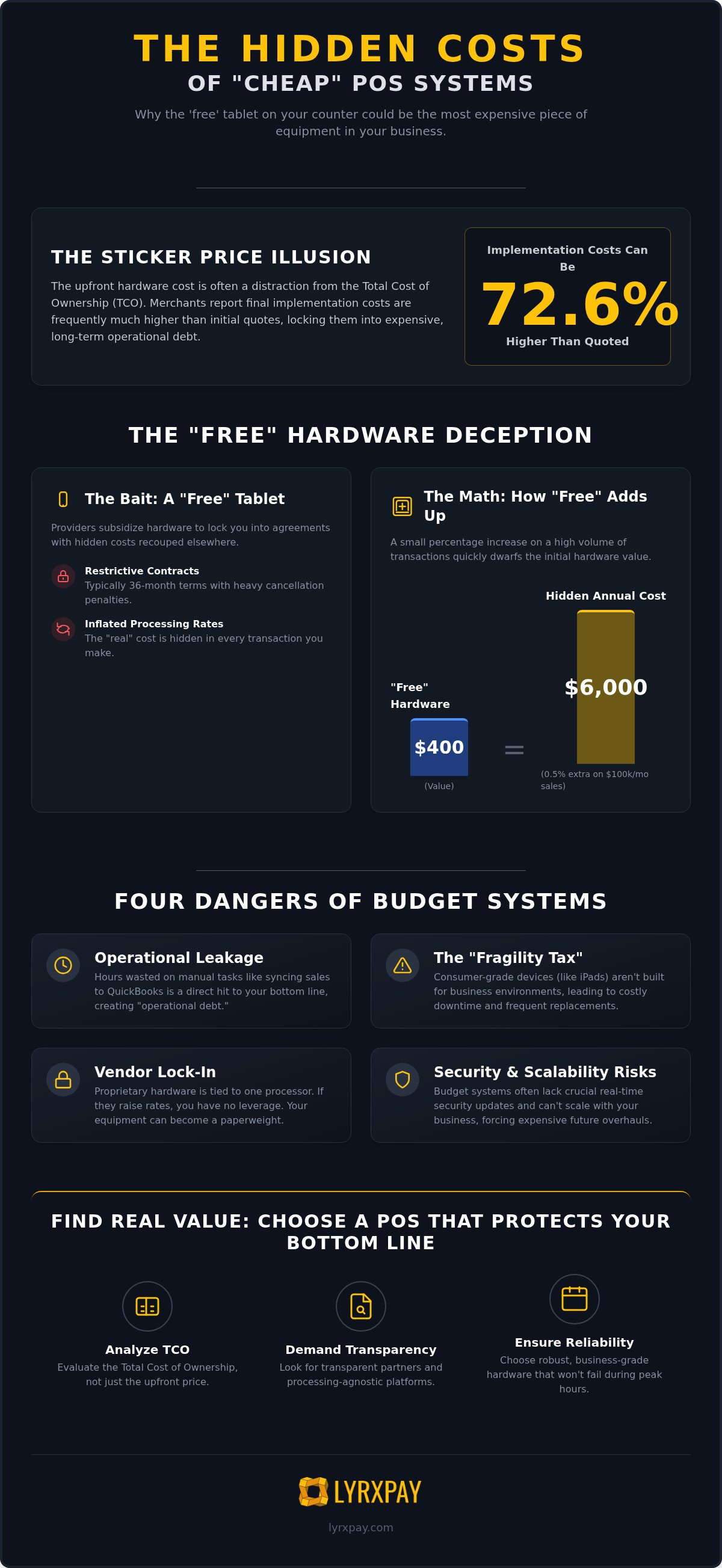
The "Free Tablet" offer is perhaps the most common trap in the industry. These hardware subsidies are almost always recouped through restrictive 36-month contracts with inflated processing rates. If a provider gives you a $400 terminal but charges an extra 0.5% on your transactions, a business processing $100,000 a month will pay $6,000 in "hidden" hardware costs every year. By the time the contract ends, you've paid for that "free" device many times over. A true Point of Sale (POS) system should be a transparent asset, not a debt disguised as a gift.
There is also the matter of "consumer-grade" versus "business-grade" equipment. An iPad is a beautiful piece of technology, but it wasn't designed to survive the heat of a commercial kitchen or the constant vibration of a high-volume checkout counter. When a consumer device fails during peak hours, the math is brutal. If your system goes down on a busy Saturday night, you aren't just losing the cost of the hardware. You are losing every transaction that walks out the door while your staff struggles to reboot a frozen screen. Business-grade terminals are built for the grind; they are designed to stay up when the pressure is on.
Proprietary Hardware and Vendor Lock-In
Cheap systems frequently rely on closed ecosystems. This means the hardware is hard-coded to work only with a specific payment processor. If that processor decides to raise your rates six months from now, you have no leverage. If you cancel your software subscription, your expensive terminals often become literal paperweights because they cannot be reprogrammed. Choosing open-standard hardware provides long-term protection. It gives you the freedom to switch partners if the service no longer meets your standards, ensuring your equipment remains a functional part of your business regardless of who handles your processing.
Maintenance, Repairs, and the 'Fragility Tax'
Budget systems often skimp on support, leaving you to handle shipping and replacement fees when things break. You might also find yourself forced to buy three or four extra third-party plugins just to get basic functionality like inventory tracking or payroll integration. Fragility Tax is the cumulative cost of replacing consumer-grade tech in high-traffic environments. If you have to replace a "cheap" card reader every six months because it can't handle the wear and tear, the hidden costs of cheap POS systems will eventually dwarf the price of a professional, industrial-grade solution.
The Processing Trap: High Transaction Fees Hiding in Plain Sight
If the hardware was free, the revenue has to come from somewhere else. In most cases, it's hiding in the fine print of your merchant statement. Many entry-level POS providers operate as "aggregators," meaning they lump your business in with thousands of others under a single merchant ID. This allows them to charge a high, flat transaction fee while they skim the difference between what the card brands charge and what you actually pay. These are the primary hidden costs of cheap POS systems that quietly drain your bank account every single day.
Let's look at the math. A "simple" flat rate of 2.9% might seem fine compared to a more complex quote, but if a transparent partner can offer you an effective rate of 2.4%, that 0.5% gap is a massive leak. For a business processing $850,000 a year, that small difference translates to $4,250 in lost profit. That's more than the cost of a premium hardware setup paid out every single year. You also need to watch for "Non-Qualified" rates. Budget providers often bury clauses that charge you extra when a customer uses a high-reward credit card or a corporate card, which can send your actual costs skyrocketing without warning. Understanding the full breakdown of POS system costs is the first step toward reclaiming your margins.
Flat-Rate vs. Interchange-Plus Pricing
Flat-rate pricing is designed for the provider's convenience, not your growth. While it feels predictable, it's almost always the most expensive way to process payments because you're paying a premium on every single transaction, even low-cost debit swipes. Transitioning to an interchange-plus model provides the transparency you need to see exactly what the banks are charging versus what your processor is taking. This level of clarity is essential for effective business liquidity management, especially when paired with next-day deposits that keep your cash flow moving.
The 'Hidden' Fee Checklist
Beyond the swipe, budget providers often pad their bottom line with administrative "gotchas." You should check your statement for:
- PCI non-compliance fees: Often a $30 to $40 monthly penalty for not completing a security survey.
- Statement and "Access" fees: Charges just for the privilege of seeing your own data or basic reporting.
- Liquidated damages: A "poison pill" termination penalty that makes it nearly impossible to switch without a massive payout.
Operational Leakage: The Hidden Labor Costs of Poor Functionality
How much is your time worth per hour? For many business owners, the true price of a bargain terminal is paid out in "Admin Hours." These are the hours spent manually fixing syncing errors, chasing down missing transactions, or correcting inventory counts that don't match reality. These inefficiencies represent the hidden costs of cheap POS systems that never appear on a sales quote but show up clearly in your stress levels and labor costs. If your staff has to double-check every report the system generates, you aren't saving money; you're paying a premium for a lack of trust.
Inaccurate inventory is a double-edged sword that cuts into your margins from both sides. When your system fails to track stock in real-time, you're either overstocking capital-intensive goods or missing out on sales because a popular item is listed as "out of stock" when it's actually sitting in the back room. Beyond stock issues, weak permission controls in budget software can lead to significant losses through employee theft. If your system doesn't offer granular access levels, you're essentially leaving the digital vault open. This invites shrink that quietly kills your profitability while you're busy managing other tasks.
The Manual Accounting Burden
If you're still manually entering sales data into your accounting software every night, you're working for your POS system instead of it working for you. The nightmare of "End of Day" reconciliation without a direct QuickBooks integration is a primary driver of operational leakage. When data syncs break or don't exist, you're forced to pay for expensive CPA cleanup fees at year-end just to make sense of your books. Automated bookkeeping can save a business 10+ hours of administrative labor monthly. Transitioning to All-in-One Business Financial Solutions ensures that your sales, payroll, and bookkeeping speak the same language from day one.
Inefficient Reporting and Missed Growth
Operating with a budget system often feels like "Blind Flying." Basic reporting might tell you how much you sold, but it won't tell you why or identify the trends that should fuel your growth. For multi-location businesses, the lack of unified reporting makes it impossible to compare performance across sites without hours of spreadsheet gymnastics. Additionally, poor customer data collection limits your marketing ROI. If you can't see who your best customers are or what they buy, you're missing the chance to build the long-term relationships that sustain a healthy business. These hidden costs of cheap POS systems eventually manifest as stagnant growth and missed opportunities.
Security and Scalability: The Risks of 'Outgrowing' a Budget System
Saving a few hundred dollars on your initial setup feels like a win until you consider the liability of a data breach. In 2026, security isn't a "set it and forget it" feature. Cheap providers often maintain their low margins by being slow to push critical security updates and patches. This delay leaves your customers' sensitive data vulnerable to evolving threats. These hidden costs of cheap POS systems are rarely discussed until a merchant is facing the fallout of a leak, which can lead to legal fees, regulatory fines, and irreparable brand damage.
PCI Compliance and Data Vulnerability
Many budget systems operate in "cloud-only" environments that place the lion's share of security liability squarely on your shoulders. You might find that your vendor charges you a monthly fee for PCI compliance without actually providing the tools to help you achieve it. By choosing integrated merchant services, you can significantly reduce your "scope" of liability. This means less paperwork for you and more protection for your customers. When your processing and software are built to work together, the system handles the heavy lifting of data encryption, protecting you from the $1,000 to $10,000 annual cost often associated with maintaining complex PCI DSS standards.
The Scalability Wall
Budget systems are often built for the "now," not for where your business will be in two years. You might hit a "scalability wall" the moment you try to add a second location or expand your inventory to 500 new SKUs. These systems often crash or slow down under the weight of growth, leading to frustrated customers and lost sales. A scalable POS is a critical partner for specialized environments like medical offices and professional services that require robust data management. Research shows that unified platforms can lead to a 22% improvement in the total cost of ownership by eliminating the need for redundant subscriptions as you expand.
The "Rip and Replace" nightmare is perhaps the most painful of the hidden costs of cheap POS systems. If you outgrow your system in 18 months, you'll pay three times more to start over than you would have spent on the right system initially. This includes the cost of new hardware, software migration, and the labor hours required to retrain your entire staff on a new interface. We believe in building a foundation that lasts. If you want to ensure your technology can handle your ambition, you should speak with a consultant about a scalable POS strategy today.
Finding Real Value: Choosing a POS That Protects Your Bottom Line
Real value isn't found in a low entry price. It's found in the margin you keep at the end of the year. To avoid the hidden costs of cheap POS systems, you need a clear-eyed view of your Total Cost of Ownership (TCO). A simple way to calculate this is to add your upfront hardware costs to 36 months of software fees and your estimated transaction fees. Then, add the cost of manual labor for bookkeeping and any third-party plugins. This total is your baseline. If your "cheap" system requires an extra 10 hours of manual reconciliation every month, that system is actually costing you thousands in lost productivity and CPA fees.
Transparency in merchant services is the ultimate discount. When you know exactly what you're paying for interchange fees versus the processor's margin, you can make data-driven decisions about your business health. Budget providers often rely on confusion to hide their profit. A true financial partner acts as a defender of your resources, offering a concierge style of interaction rather than a generic 1-800 support line. When a system crash happens or a deposit is delayed, you need an expert who has already done the heavy lifting. You don't need a script-reader in a remote call center.
Questions to Ask Any POS Vendor Before Signing
Don't get blinded by a slick demo. Ask the hard questions before you sign any contract to ensure you aren't walking into a trap. These answers will reveal the true long-term costs of the partnership.
- Can I choose my own merchant service provider, or am I locked into your specific rates?
- Is the hardware proprietary, or is it open-standard equipment I can repurpose later?
- What is the specific monthly cost for a deep, two-way QuickBooks or Xero integration?
- Is there a liquidated damages clause that forces me to pay out the remainder of the contract if I cancel early?
The LyrxPay Advantage: Integrated Financial Health
We don't just sell software; we provide integrated financial health. By combining transparent, low-fee processing with POS hardware that actually lasts, we eliminate the operational leakage that stalls your growth. Having your POS, payroll, and bookkeeping under one roof means your data is always accurate and your reporting is unified. We treat next-day deposits as a standard requirement for your business liquidity, not a premium feature you have to pay extra for. We are a proactive ally. We anticipate your administrative needs so you can focus on the craft that made you start your business in the first place.
Identifying the hidden costs of cheap POS systems today is the first step toward a more profitable 2026. If you're ready to stop the leaks, start by auditing your current merchant statement for those access fees and non-compliance penalties. You deserve a partner who values your time as much as you do. Managed care for your business finances starts with choosing a partner that puts your margins first.
Secure Your Margins with a Strategy Built for Growth
Your business deserves better than a "free" tablet that drains your profits through the hidden costs of cheap POS systems. We have explored how hardware subsidies, inflated processing rates, and operational leakage can turn a bargain into a financial burden. By prioritizing transparency and industrial-grade reliability, you move from a state of constant troubleshooting to a state of confident expansion. It's time to stop fighting your technology and start letting it work for you.
We believe in providing the clarity you need to reclaim your time and resources. With next-day deposits included, expert QuickBooks integration, and no hidden non-compliance fees, we offer a path forward that focuses on your long-term operational health. You can Stop Overpaying for Your POS—Get a Transparent LyrxPay Quote Today and discover the difference a true concierge financial partner makes. We're here to help you build a more efficient, profitable future for your business starting right now.
Frequently Asked Questions
What is the most common hidden cost in a POS system?
Payment processing fees are the most significant hidden costs of cheap POS systems because they are ongoing rather than one-time expenses. Many budget providers act as aggregators and charge between 2.3% and 3.5% per transaction. These fees can quietly drain thousands of dollars from your margins every year. If you don't have a transparent breakdown of these costs, you're likely paying a massive premium on every swipe.
Can I use my existing credit card processor with a new POS system?
It depends on whether the system is "processing agnostic" or "proprietary." Many budget systems lock you into their own high-fee services, making it impossible to use a third-party processor. Choosing an open-standard system allows you to negotiate your own rates and keep your existing processing relationship. If you're forced into a proprietary setup, you lose all leverage to lower your costs as you grow.
Why do some POS companies give away hardware for free?
POS companies offer free hardware to lock you into long-term contracts that often include high transaction fees or liquidated damages clauses. These contracts typically range from 36 to 48 months. Over the life of the agreement, you'll likely pay several times the retail price of the hardware through those inflated processing margins. It's a classic strategy to trade a small upfront saving for a large, long-term debt.
How much should I expect to pay for POS software monthly?
You should expect to pay between $50 and $100 per month for a standard retail software subscription. For multi-location businesses, this cost typically ranges from $60 to $150 per location. While some systems offer $0 monthly plans, they usually compensate by charging significantly higher transaction fees on every swipe. It's important to calculate the total monthly cost of both software and processing before signing any agreement.
What is Interchange-Plus pricing and why does it matter for POS systems?
Interchange-Plus is a transparent pricing model that separates the actual cost charged by card brands from the processor's markup. This matters because it prevents your provider from padding their margins on low-cost transactions, like debit cards. It's the most effective way to identify the hidden costs of cheap POS systems and ensure you're paying a fair rate. Without this transparency, your provider can raise your rates without any explanation.
How does POS integration with QuickBooks save me money?
Integration saves you money by eliminating manual data entry and reducing expensive CPA cleanup fees at year-end. If your sales and inventory sync automatically, you can save 10 or more hours of administrative labor every month. This allows you to focus on growth instead of fixing broken data entries or reconciling statements by hand. It's a direct way to stop "operational leakage" and improve your bottom line.
What happens if my POS hardware breaks during a shift?
If you're using consumer-grade hardware like a standard tablet, you're often left to handle the replacement yourself during a crisis. Business-grade systems are built for durability and often include swappable components or overnight replacement services. Without a reliable backup plan, a single hardware failure during peak hours can cost you more in lost sales than you saved on the initial purchase. Reliability is a core component of real value.
Is a cloud-based POS more expensive than a traditional one?
Cloud-based systems are generally more affordable upfront because they require less local server infrastructure. However, they can become more expensive over time if they require multiple third-party plugins for basic reporting or payroll. Traditional systems often have higher initial costs but offer more robust offline capabilities and one-time licensing options. You should evaluate the 36-month total cost of both models to see which fits your specific business needs.